
TFT Displays
Contents List
- Introduction.
- What is a TFT Display?
- Advantages of TFT Displays.
- How Does TFT Display Work?
- What’s Inside a TFT Display?
- Key TFT Display Specifications.
- Types of TFT Display Panel.
- Difference between TFT Display vs AMOLED Display.
- Applications for TFT Display.
- How to Choose the Right TFT Display for Your Application?
- TFT Display Interfaces.
- How to Connect TFT Display to Arduino?
- Advanced Techniques for Using TFT Displays with Arduino.
- Frequently Asked Questions(FAQ).
- Conclusion.
Reading Time Approximately is 20 minute
Introduction
TFT Displays are a widely used and rapidly evolving technology. The acronym stands for thin-film transistor, and it refers to the technology behind the vast majority of flat screens you encounter daily, from your laptop and smartphone to car dashboards and airport information boards.
Knowing about is can help you stay up to date with the latest developments in display technology and understand the types of displays available, their features, and their benefits. This article can help you make a more informed decision and select the device that best fits your needs.
Suppose you are an engineer or a developer, and finding which type of display to use in your product and how to design your product for optimal performance. In that case, this article about about TFT displays can help you make a better decision.
What is a TFT Display?
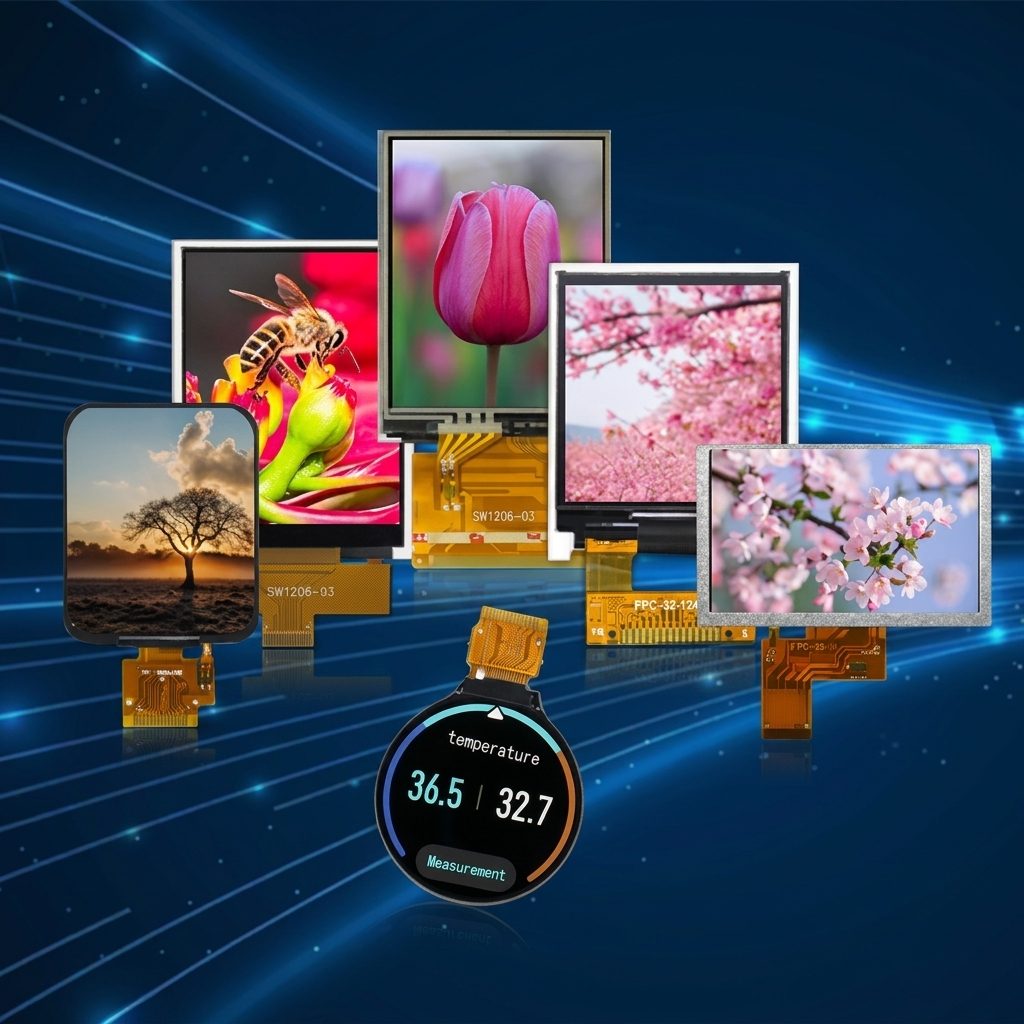
A TFT display is a type of flat panel display (FPD) that uses thin film transistor (TFT) technology. A TFT combines the thinness of thin film and the activeness of the transistor (switching, amplification). Both Liquid Crystal Display (LCD) and Organic Light Emitting Diode (OLED) displays use this technology. But nowadays, the term “TFT display” generally refers to TFT-LCD. Another type of TFT OLED display is called AMOLED, a TFT-based active-matrix OLED display.
TFT is one of the keys for TFT display technology as a field effect transistor (FET) variant. It can control each pixel by amplifying or switching electronic signals, in contrast to passive matrix mode or simple, direct-driven mode (i.e., a segments LCD).
Over time, the technology has evolved from amorphous silicon TFT to polycrystalline silicon (p-Si TFT), and from high-temperature poly-silicon (HTPS) TFT to low-temperature poly-silicon (LTPS) TFT. The development of TFT technology has also been used in not just LCD, but also OLED and e-ink displays. With the continuous improvement of semiconductor technology, the number of pixels in a display is decreasing, and the resolution is getting higher and higher.
Advantages of TFT Displays
TFT displays have numerous advantages over other display technologies. Some of the key advantages include:
- Display High Information Content.
- Achieve Full Color Easily.
- Provide Faster Response Time and Better Clarity.
- High-resolution and image quality.
- Wide viewing angles.
- Low power consumption.
- Compact and lightweight.
- Lifespan and Durability.
What’s Inside a TFT Display?
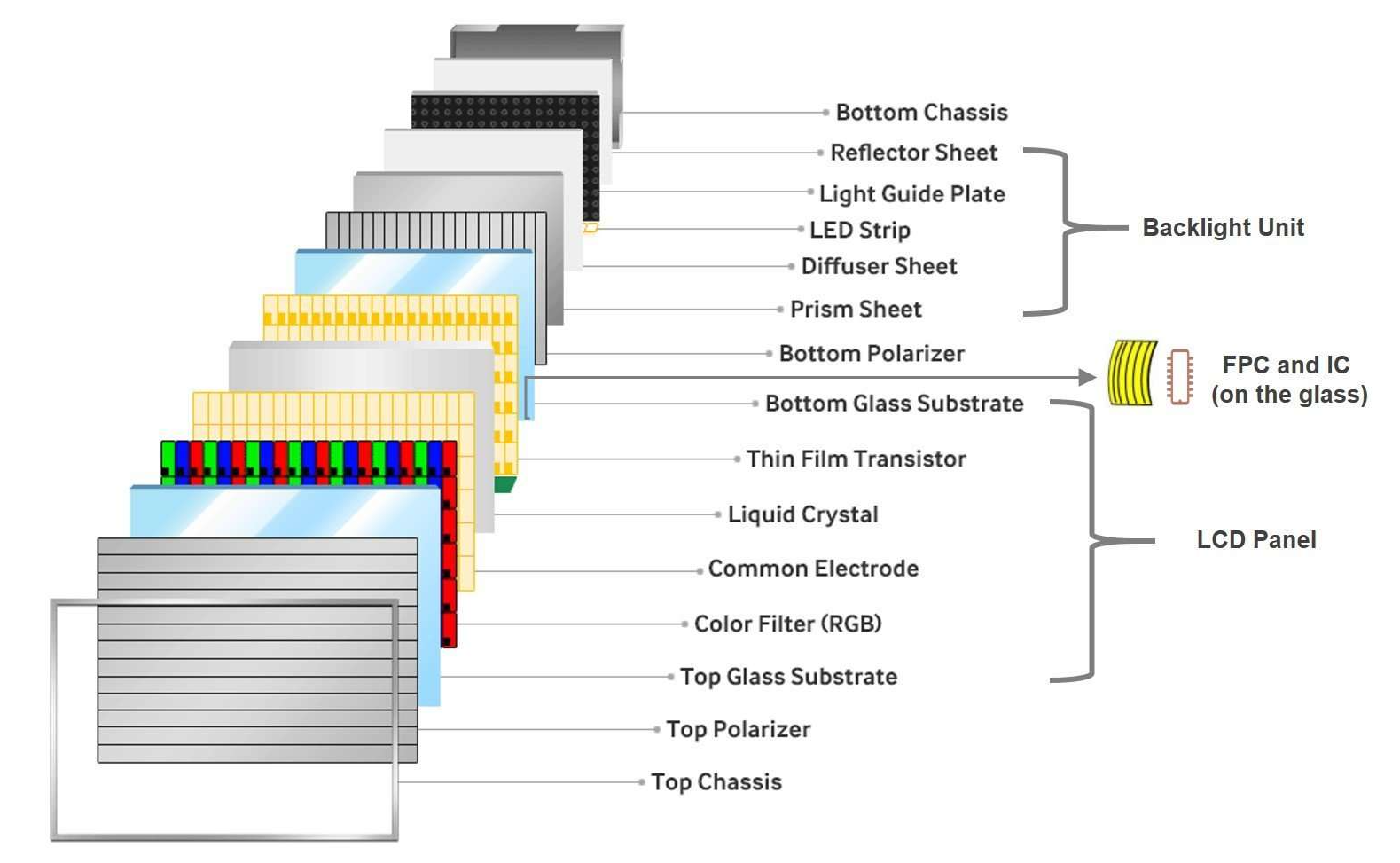
A TFT screen is a sandwich of many thin layers working together. At the core are two sheets of glass with a liquid crystal mixture sealed between them. On one glass layer sits the grid of thin-film transistors. Behind everything is a backlight, typically LEDs, that provides the actual illumination. The liquid crystals don’t produce light on their own. Instead, the transistors control how the crystals twist, which determines how much backlight passes through each pixel.
Surrounding the liquid crystal layer are polarizing films that filter the light into specific orientations. Additional optical films spread the backlight evenly across the screen, recycle stray light to improve efficiency, and correct for color shifts at different viewing angles. A typical TFT panel also includes a reflector behind the backlight with about 95% reflectivity, bouncing escaping light back through the display so less energy is wasted.
How Does TFT Display Work?
The Basic Principle
A TFT LCD is a transmissive display — it produces images by selectively blocking light from a backlight source. The display stack consists of several layers working together:
- Backlight — An LED light source (typically edge-lit or direct-lit) that provides uniform white illumination across the display area.
- Rear polarizer — Polarizes the backlight into a single orientation.
- TFT substrate — A glass substrate with a matrix of thin-film transistors, one per sub-pixel, that act as switches controlling the voltage applied to each pixel.
- Liquid crystal layer — Liquid crystal molecules sandwiched between the TFT substrate and the color filter substrate. The molecular alignment rotates in response to the electric field from each TFT, controlling how much light passes through.
- Color filter substrate — Red, green, and blue sub-pixel color filters that create the full-color image.
- Front polarizer — A second polarizer oriented perpendicular to the rear polarizer. Only light whose polarization has been rotated by the liquid crystal layer passes through.
The Role of Thin-Film Transistors
The “TFT” in TFT LCD refers to the thin-film transistor at each sub-pixel. In a passive-matrix LCD, pixels are addressed by row and column — which limits contrast, response time, and resolution because each pixel is only actively driven for a fraction of the frame time.
In a TFT (active-matrix) LCD, each sub-pixel has its own dedicated transistor that acts as a switch and a capacitor that holds the charge between refresh cycles. This means:
- Each pixel maintains its state for the full frame period, producing higher contrast.
- Pixels can be switched independently and quickly, enabling fast response times.
- The matrix can scale to high resolutions without the cross-talk and contrast loss of passive addressing.
Modern TFT LCDs use amorphous silicon (a-Si), low-temperature polysilicon (LTPS), or indium gallium zinc oxide (IGZO) as the thin-film semiconductor material. a-Si is the most common for standard displays; LTPS enables higher pixel densities and is used in high-resolution mobile and wearable displays; IGZO offers lower power consumption and is used in high-resolution large-format panels.
Key TFT Display Specifications
Resolution
Resolution defines the number of pixels in the horizontal and vertical dimensions. Higher resolution enables finer detail and more information density.
Common TFT resolutions:
- QVGA (320×240) — Small embedded displays, simple interfaces
- WQVGA (480×272) — Compact HMI, instrument clusters
- WVGA (800×480) — Mid-size industrial and automotive displays
- WXGA (1280×800) — Standard for 10″ tablets and industrial panels
- Full HD (1920×1080) — Large industrial monitors, medical displays, digital signage
- 4K UHD (3840×2160) — High-end medical imaging, professional visualization
Resolution alone does not determine image quality — pixel density (pixels per inch, PPI) matters more. A 1920×1080 display at 5″ has very high PPI (441), while the same resolution at 24″ is standard (92 PPI).
Brightness (Luminance)
Measured in nits (cd/m²), brightness determines readability in ambient light:
- 200-350 nits — Indoor use, controlled lighting
- 500-700 nits — Bright indoor environments, indirect sunlight
- 1,000+ nits — Direct sunlight readability (with optical bonding and AR coating)
- 1,500-2,500 nits — Full outdoor sunlight (marine, military, outdoor kiosks)
Higher brightness requires more backlight power and generates more heat. Optical bonding dramatically improves effective readability at any brightness level, often allowing a lower-brightness (and lower-power) backlight to achieve equivalent readability.
Contrast Ratio
The ratio of the brightest white to the darkest black the display can produce. Higher contrast improves readability, color depth, and image quality:
- 500:1 — Acceptable for basic information display
- 800:1 to 1,000:1 — Good for general applications
- 1,500:1+ — Excellent for data visualization and graphics
- 3,000:1+ — Medical imaging and professional applications
Optical bonding improves effective contrast by eliminating internal reflections that raise the black level.
Viewing Angle
The angle from center at which the display maintains acceptable contrast and color accuracy:
- TN panels: 60-80° typical, asymmetric (narrower from below)
- IPS panels: 170°+ symmetric — the standard for multi-viewer applications
- MVA panels: 160-170° typical
Specified as the angle where contrast ratio drops to 10:1 from the perpendicular. IPS panels maintain usable image quality well beyond the specified angle.
Response Time
The time required for a pixel to transition between gray levels, measured in milliseconds (ms):
- 1-5 ms — TN panels. Fast motion, minimal blur
- 5-15 ms — IPS panels. Suitable for most applications
- 8-25 ms — MVA panels. Acceptable for static and slow-motion content
Response time is most critical for applications displaying fast-moving content — video, animation, or rapidly updating waveforms.
Operating Temperature
The ambient temperature range over which the display functions within specification:
- Standard: 0°C to 50°C — Office and controlled indoor environments
- Industrial: -20°C to 70°C — Factory, vehicle, and outdoor enclosures
- Extended: -30°C to 80°C — Harsh environments, military, marine
- Extreme: -40°C to 85°C — With heater circuits for cold-start operation
LCD response time increases at low temperatures. Below -20°C, standard panels become visibly sluggish. Heater circuits address this by warming the panel to operational temperature.
Backlighting
All TFT LCDs require a backlight — the liquid crystal layer modulates light but does not generate it.
LED Backlighting
Modern TFT displays use LED backlighting exclusively. Two configurations:
- Edge-lit: LEDs positioned along one or more edges of a light guide plate that distributes light across the display area. Produces thin display assemblies with good uniformity. Standard for most TFT displays.
- Direct-lit (full array): LEDs positioned behind the entire display area. Enables local dimming (zones of the backlight can be dimmed independently) for improved contrast. Used in premium large-format displays.
Backlight Dimming
- PWM (pulse-width modulation) dimming controls brightness by rapidly switching the LEDs on and off. DC dimming controls brightness by varying the LED current. Most display backlights support dimming via an external PWM signal (typically 200 Hz – 20 kHz) or DC voltage input.
- Wide dimming ranges — from maximum brightness down to below 1 nit — are critical for applications that operate in both bright and dark environments (marine, military, automotive).
Types of TFT Display Panel
The liquid crystal alignment mode determines the fundamental optical characteristics of a TFT panel. Three modes dominate the market:
1- TN (Twisted Nematic)
The original and simplest TFT LCD technology. Liquid crystal molecules twist 90° between the two substrates in their relaxed state, rotating polarized light to pass through both polarizers. Applying voltage untwists the molecules, blocking light.
Characteristics:
-
- Viewing angle: Narrow — typically 60-80° with noticeable color shift and contrast loss off-axis. The worst viewing direction is typically from below.
- Response time: Fast — 1-5 ms gray-to-gray. The fastest mainstream LCD technology.
- Contrast ratio: Moderate — 600:1 to 1,000:1 typical
- Cost: Lowest cost TFT technology
- Best for: Applications viewed head-on from a fixed position — single-user instruments, embedded displays, cost-sensitive product
2- IPS (In-Plane Switching)
Liquid crystal molecules rotate in the plane parallel to the substrate surfaces (rather than tilting as in TN). This fundamentally different switching mechanism produces wide, symmetric viewing angles.
Characteristics:
- Viewing angle: Wide — 170°+ in all directions with minimal color shift and contrast degradation. The defining advantage of IPS.
- Response time: Moderate — 5-15 ms gray-to-gray. Slower than TN but adequate for all but the most demanding motion applications.
- Contrast ratio: Good — 800:1 to 1,500:1 typical
- Color accuracy: Excellent — consistent color rendering across the viewing cone makes IPS the preferred choice for color-critical applications
- Cost: Moderate premium over TN
- Best for: Multi-viewer applications, medical displays, industrial HMI, automotive, and any application where viewing angle matters
IPS variants include ADS (Advanced Super Dimension Switching) and FFS (Fringe Field Switching), which offer improved transmittance and power efficiency while maintaining IPS viewing angle characteristics.
3- MVA (Multi-Domain Vertical Alignment)
Liquid crystal molecules are vertically aligned in their relaxed state, producing a true black when no voltage is applied. Multiple alignment domains within each pixel average out viewing angle dependencies.
Characteristics:
- Viewing angle: Wide — 160-170° typical, narrower than IPS but much wider than TN
- Response time: Moderate to slow — 8-25 ms. The slowest mainstream TFT technology.
- Contrast ratio: Highest — 2,000:1 to 5,000:1 typical. The vertical alignment produces deep blacks.
- Color accuracy: Good, though not quite matching IPS for critical applications
- Cost: Similar to IPS
- Best for: Applications prioritizing contrast ratio — medical imaging, professional monitors, displays viewed in dark environments
Difference between TFT Display vs AMOLED Display
An OLED display is a type of FPD with self-emission ability, unlike an LCD with LED backlights. It sets a film of organic compounds as the electroluminescent layer to emit light when applied an electric current.
Similar to LCD, OLED (Organic Light-Emitting Diode) has two main variants, PMOLED and AMOLED, according to their way of addressing the pixels. PMOLEDs are commonly used in mini to small displays. And it is obviously unable to meet the requirement of high color, large size, and fast responsive displays.
Therefore, AMOLED is the best option to compete with IPS TFT display.
| Comparison | TFT Display | AMOLED Display |
|---|---|---|
| Display Technology | LCD with LED backlight | OLED with self-emissive pixels |
| Price | Lower cost due to mature, established technology | Generally more expensive |
| Lifetime | Longer lifespan; typically more durable for long-term use | Shorter lifespan, with potential pixel aging and burn-in |
| Available Sizes | Wide range, from small displays to very large panels | Available in many sizes, but less comprehensive for certain applications |
| Power Consumption | Can consume less power with predominantly white content | Often more efficient with dark content |
| Sunlight Readability | Easier and more cost-effective to enhance through brighter backlights | High-brightness solutions can require more advanced materials |
| Brightness | High brightness is readily achievable | Excellent brightness, especially in newer generations |
| Color & Contrast | Good color reproduction and contrast | Superior contrast and highly saturated colors |
| Viewing Angle | Good, especially with IPS TFT technology | Excellent viewing angles |
| Design Flexibility | Suitable for flat displays and various application formats | Excellent for slim, curved, and flexible designs |
| Burn-in Risk | Very low | Higher risk due to organic pixel aging |
| Best For | Industrial, automotive, medical, embedded, commercial, and cost-sensitive applications | Premium smartphones, wearables, high-end consumer electronics, and applications requiring deep blacks |
| Overall Advantage | Cost-effective, long-lasting, versatile, and easier to optimize for sunlight readability | Slimmer design, superior contrast, wider viewing angles, and richer colors |
Applications for TFT Display
- Mobile devices and smartphones.
- Computer monitors and screens.
- Televisions.
- Tablets.
- Automotive instrument clusters.
- Automotive infotainment systems.
- Heads-up displays.
- Industrial control systems.
- Medical equipment.
- Point-of-sale terminals.
- Outdoor displays.
- Emergency monitoring systems.
- Remote installations.
- Harsh-environment applications.
- High-temperature environments.
- Low-temperature environments.
- Dust- and water-exposed applications.
- Vibration- and shock-resistant applications.
- Around-the-clock equipment.
- Commercial display systems.
- Industrial display terminals.
How to Choose the Right TFT Display for Your Application?
Selecting the most suitable TFT display for your application is a critical decision that can impact the overall performance and user experience. Consider the following factors when choosing the right TFT display:
Display Size
Determine the optimal display size based on your application’s requirements and available space. A larger display may offer a better visual impact, but it could also increase power consumption and cost.
Resolution
The display resolution directly affects the level of detail and clarity in visuals. Higher resolutions are essential for applications that demand crisp graphics and text, such as medical equipment and gaming consoles.
Viewing Environment
Assess the application’s typical viewing environment, including lighting conditions and viewing angles. Consider opting for sunlight-readable displays, wide viewing angles, and high brightness displays for challenging lighting conditions.
Touch Screen Requirements
If your application requires touch screen functionality, choose a TFT display that supports the appropriate touch screen technology, such as resistive or capacitive touch.
Interface Compatibility
Ensure that the TFT display’s interface is compatible with your microcontroller or host system. Common interface options include RGB, SPI, I2C, and UART.
Temperature Range
Consider the operating temperature range of the TFT display, especially if your application will be exposed to extreme temperature variations.
Touch Screen Controller Integration
If your application includes touchscreen functionality, check if the TFT display has an integrated touchscreen controller or if an external controller is required.
Power Consumption
Evaluate the power consumption of the TFT display, particularly for battery-powered applications. Lower power consumption can lead to longer battery life and increased energy efficiency.
Longevity and Availability
Choose displays from reputable manufacturers with a track record of producing reliable and long-lasting products. Ensure that the chosen TFT display model will be available for the duration of your product’s lifecycle.
Cost Considerations
Balance performance and features with your budget constraints. While high-end displays may offer cutting-edge capabilities, a cost-effective display that meets your essential requirements may be the better choice.
By carefully evaluating these factors and considering the specific needs of your application, you can make an informed decision and select the ideal TFT display that aligns perfectly with your project’s goals.
TFT Display Interfaces
The display interface carries pixel data from your system processor to the display’s driver IC. Interface selection depends on resolution, frame rate, available processor pins, and cable length requirements.
SPI (Serial Peripheral Interface)
-
- Bandwidth: Low (10-80 MHz clock)
- Pin count: 4-5 signals
- Best for: Small displays (under 3″), low resolution, simple UI updates
- Typical resolution: Up to 320×240
RGB (Parallel)
-
- Bandwidth: Medium (up to ~60 MHz pixel clock)
- Pin count: 18-24 data lines + control signals
- Best for: Mid-size displays driven by microcontrollers with built-in LCD controllers (STM32, NXP i.MX RT)
- Typical resolution: Up to 1280×800 at 60 Hz
LVDS (Low-Voltage Differential Signaling)
-
- Bandwidth: High (up to 1.2 Gbps per pair)
- Pin count: 4-10 differential pairs
- Best for: Large displays, long cable runs (up to 5m+), noise-immune connections
- Typical resolution: 1280×800 through 1920×1200
MIPI DSI (Mobile Industry Processor Interface – Display Serial Interface)
-
- Bandwidth: Very high (up to 4.5 Gbps per lane, multi-lane)
- Pin count: 2-8 differential pairs
- Best for: High-resolution displays driven by application processors (NXP i.MX, Qualcomm, MediaTek)
- Typical resolution: 720×1280 through 3840×2160
eDP (Embedded DisplayPort)
-
- Bandwidth: Very high (up to 8.1 Gbps per lane)
- Pin count: 2-4 differential pairs
- Best for: Large, high-resolution panels (15″+) driven by x86 or high-end ARM processors
- Typical resolution: 1920×1080 through 3840×2160
How to Connect TFT Display to Arduino?

For electronics enthusiasts and developers, integrating TFT displays with Arduino opens up a realm of exciting possibilities. With the power of Arduino’s versatile microcontroller and the stunning visual capabilities of TFT displays, you can create interactive projects, graphical interfaces, data visualization tools, and more. Let’s explore the steps to connect a TFT display to Arduino and get started with your own innovative projects.
Step 1: Gather the Required Components
Before diving into the connection process, ensure you have all the necessary components. You will need an Arduino board (such as Arduino UNO), a compatible TFT display module (be sure to check its specifications and pinout details), jumper wires, and a breadboard (optional but recommended for prototyping).
Step 2: Identify TFT Display Pins
Carefully identify the pins on your TFT display module. Typical TFT displays come with SPI (Serial Peripheral Interface) communication, where you will find pins labeled SCK, MOSI, CS, D/C, and RST. Some displays might use I2C (Inter-Integrated Circuit) communication, featuring pins like SDA and SCL. Refer to the datasheet or product documentation for accurate pin identification.
Step 3: Connect the TFT Display to Arduino
Using the jumper wires, establish the connection between the TFT display and the Arduino board. For SPI communication, connect SCK to Arduino’s SCK (Serial Clock), MOSI to MOSI (Master Out Slave In), CS to the digital pin you select as the Chip Select (e.g., D10), D/C to another digital pin (e.g., D9), and RST to a digital pin (e.g., D8). If you are using an I2C display, connect SDA to Arduino’s SDA (Serial Data) and SCL to SCL.
Step 4: Power Up the Display
Provide power to the TFT display and Arduino. Some TFT modules require an external power supply, while others can draw power directly from the Arduino board’s 5V pin.
Step 5: Install the TFT Library
To communicate with the TFT display, you’ll need the appropriate library for your specific module. Install the library by going to the Arduino IDE’s Library Manager and searching for the relevant TFT library. Install the library, and you’re ready to start programming the display.
Step 6: Write the Code
Using the TFT library and Arduino IDE, begin writing the code to display text, and graphics, or even create interactive touch interfaces (if your display has touch capabilities). Experiment with various functions and commands to achieve the desired visual output on the TFT display.
Step 7: Upload and Test
Upload the code to your Arduino board and watch as your creations come to life on the TFT display. Test different scenarios, explore color options, and refine your code to achieve the best results.
By mastering the art of connecting TFT displays to Arduino, you’ll unlock a world of possibilities, from creating interactive art installations to developing user-friendly interfaces for your projects. The combination of Arduino’s programmability and TFT displays’ visual prowess provides a powerful platform for turning your ideas into reality.
Advanced Techniques for Using TFT Displays with Arduino
Once you have successfully connected and displayed basic content on your TFT display with Arduino, it’s time to delve into more advanced techniques. These strategies will elevate your projects and unleash the full potential of TFT displays, making them interactive, dynamic, and visually stunning.
Touch Screen Integration
Many TFT displays come with built-in touch functionality, enabling users to interact directly with the screen. To implement touch screen capabilities in your Arduino projects, you will need a touch screen controller that communicates with the Arduino board. Some common touchscreen controllers include XPT2046 and ADS7843. Connect the touch screen controller to the TFT display and Arduino, and install the corresponding library to interpret touch data. Now, you can design interactive interfaces with buttons, sliders, and other touch elements, making your projects more user-friendly and engaging.
Implementing Animation
Static visuals are captivating, but animation adds life and dynamism to your projects. With Arduino and TFT displays, you can create simple animations by manipulating graphics or text elements on the screen. Use functions like drawing lines, circles, and rectangles with incremental changes in position to create motion effects. Additionally, you can utilize sprite sheets to display animated characters or icons. Combining animation with user input through touchscreen integration opens up endless possibilities for crafting interactive stories and games.
Real-Time Data Visualization
TFT displays are excellent tools for visualizing real-time data. With Arduino’s ability to collect data from sensors or other sources, you can present information on the TFT screen in real-time graphs, charts, or gauges. For instance, you can build weather stations, health monitors, or environmental sensors that provide live updates and display them graphically on the TFT display. Real-time data visualization empowers users to make informed decisions and enhances the overall user experience.
Multi-Layer Display
Some TFT displays support multi-layer rendering, allowing you to overlay graphics or text on top of each other. This feature enables the creation of transparent or semi-transparent elements, creating a more immersive user interface. You can display dynamic information on one layer while keeping static elements visible on another layer. For instance, you can have a navigation menu persistently visible while displaying real-time data on a separate layer, optimizing the use of screen real estate.
User Interface Design
Designing an intuitive and aesthetically pleasing user interface is vital for user satisfaction. Consider the layout, color scheme, and font selection to create an appealing user experience. Utilize icons, images, and graphical elements to convey information effectively. By investing time in thoughtful user interface design, you can ensure that users find your projects visually appealing and user-friendly.
With these advanced techniques, you can elevate your Arduino projects with TFT displays to new heights. Whether you are building interactive applications, real-time data visualizers, or captivating animations, the combination of Arduino and TFT displays offers a world of possibilities. As you explore and experiment with these advanced techniques, remember to share your creations with the maker community, as they can inspire and spark creativity in others.
Frequently Asked Questions
What’s the difference between TFT and LCD?
TFT is a type of LCD. “LCD” refers to any display using liquid crystals — including passive-matrix (character LCD, graphic LCD) and active-matrix (TFT LCD) technologies. TFT LCD uses thin-film transistors for active-matrix addressing, enabling higher resolution, faster response, and better image quality than passive-matrix LCDs. When people say “TFT” they typically mean an active-matrix color LCD display.
IPS vs TN — which should I choose?
Choose IPS for almost all new designs. The viewing angle, color accuracy, and consistency advantages of IPS outweigh TN’s cost advantage in most applications. Choose TN only when cost is the dominant factor and the display will be viewed head-on from a fixed position.
What resolution do I need?
Resolution depends on your content. Simple status displays (icons, large text, gauges) work well at QVGA (320×240). Data-rich interfaces (tables, charts, multi-zone layouts) benefit from WVGA (800×480) or higher. Imaging and video applications typically require Full HD (1920×1080) or higher. Higher resolution always means higher interface bandwidth, more processing power, and more memory — specify what your application actually needs, not the maximum available.
How bright does my display need to be?
For indoor use in controlled lighting, 300-500 nits is sufficient. For bright indoor environments or indirect sunlight, 500-700 nits. For direct sunlight, 1,000+ nits with optical bonding and AR coating. See our harsh environments guide for outdoor display recommendations.
Can TFT displays operate in cold temperatures?
Standard TFT panels operate down to -20°C, with extended-range versions reaching -30°C to -40°C. Below -20°C, liquid crystal response time increases noticeably. Heater circuits warm the panel to operational temperature for cold-start reliability. See our harsh environment solutions.
What’s the lifespan of a TFT display?
TFT display lifespan is primarily determined by backlight lifetime, typically rated at 50,000-100,000 hours to 50% of original brightness. At typical industrial brightness levels and operating temperatures, this translates to 6-12 years of continuous operation. The LCD panel itself does not wear out under normal conditions.
Conclusion
TFT displays have revolutionized the visual interface landscape and are widely employed in diverse applications across industries. From portable handheld devices to sophisticated industrial control systems, TFT displays play a crucial role in delivering clear, vibrant, and interactive visual information.
Understanding the fundamentals of TFT display technology, their working principles, and the various features they offer can empower engineers, developers, and designers to leverage these versatile displays to create cutting-edge solutions that enhance user experiences.
شاشات TFT
تُعد شاشات TFT من تقنيات العرض الأكثر انتشارًا وتطورًا في الوقت الحالي. ويشير الاختصار TFT إلى «الترانزستور ذي الأغشية الرقيقة»، وهي التقنية التي تقف وراء معظم الشاشات المسطحة التي نستخدمها يوميًا، بدءًا من أجهزة الكمبيوتر والهواتف الذكية، وصولًا إلى شاشات السيارات ولوحات المعلومات في المطارات.
قائمة المحتويات
- مقدمة
- ما هي شاشة TFT؟
- مزايا شاشات TFT
- كيف تعمل شاشة TFT؟
- ماذا يوجد داخل شاشة TFT؟
- أهم مواصفات شاشات TFT
- أنواع لوحات TFT
- الفرق بين شاشة TFT وشاشة AMOLED
- تطبيقات شاشات TFT
- كيف تختار شاشة TFT المناسبة لتطبيقك؟
- واجهات شاشات TFT
- كيفية توصيل شاشة TFT مع Arduino
- تقنيات متقدمة لاستخدام شاشات TFT مع Arduino
- الأسئلة الشائعة
- الخلاصة
وقت القراءة: حوالي 20 دقيقة
مقدمة
أصبحت شاشات TFT جزءًا أساسيًا من عالم الإلكترونيات وأنظمة العرض الحديثة، كما تتطور تقنياتها باستمرار لتقديم دقة أعلى وألوان أفضل واستهلاك أكثر كفاءة للطاقة. وتساعد معرفة أساسيات هذه التقنية على فهم الخيارات المتاحة في سوق الشاشات واختيار الحل الأنسب لكل مشروع.
وإذا كنت مهندسًا أو مطورًا تعمل على تصميم منتج إلكتروني أو نظام تحكم، فإن فهم خصائص شاشات TFT وأنواعها وواجهاتها يمكن أن يساعدك على اتخاذ قرار أكثر دقة عند اختيار الشاشة، خصوصًا عندما يتعلق الأمر بجودة الصورة، وزاوية الرؤية، والسطوع، واستهلاك الطاقة، وبيئة التشغيل.
ما هي شاشة TFT؟
شاشة TFT هي نوع من شاشات العرض المسطحة يعتمد على تقنية الترانزستور ذي الأغشية الرقيقة. وتجمع هذه التقنية بين طبقات رقيقة من المواد شبه الموصلة وعناصر ترانزستورية تعمل كمفاتيح إلكترونية للتحكم في وحدات البكسل.
وعلى الرغم من أن تقنية TFT يمكن استخدامها مع أكثر من نوع من تقنيات العرض، مثل شاشات LCD وOLED، فإن مصطلح «شاشة TFT» يُستخدم عادةً للإشارة إلى شاشات TFT-LCD. أما شاشات OLED التي تعتمد على مصفوفة نشطة من الترانزستورات فتُعرف عادةً باسم AMOLED.
يعمل كل ترانزستور في الشاشة على التحكم في الإشارة الكهربائية الخاصة بالبكسل أو بالبكسل الفرعي، مما يسمح بتغيير حالة كل عنصر بصورة مستقلة وسريعة. وهذا ما يميز تقنية المصفوفة النشطة عن شاشات المصفوفة السلبية أو شاشات القطاعات التقليدية.
ومع تطور تقنيات تصنيع أشباه الموصلات، انتقلت تقنية TFT من السيليكون غير المتبلور إلى تقنيات أكثر تطورًا مثل السيليكون متعدد البلورات وLTPS وIGZO. ولم يعد استخدامها مقتصرًا على شاشات LCD، بل امتد أيضًا إلى OLED وبعض تقنيات الحبر الإلكتروني، الأمر الذي ساهم في الوصول إلى كثافات بكسلات أعلى ودقة عرض أكبر.
مزايا شاشات TFT
توفر شاشات TFT مجموعة واسعة من المزايا التي جعلتها خيارًا شائعًا في الأجهزة الإلكترونية والأنظمة الصناعية والاستهلاكية، ومن أهمها:
- عرض كمية كبيرة من المعلومات على مساحة صغيرة.
- إمكانية إنتاج صور ملونة بالكامل بسهولة.
- سرعة استجابة جيدة ووضوح مرتفع.
- دقة عالية وجودة صورة ممتازة.
- إمكانية توفير زوايا رؤية واسعة، خصوصًا مع لوحات IPS.
- إمكانية تحقيق استهلاك منخفض للطاقة حسب التصميم.
- تصميم نحيف وخفيف الوزن.
- عمر تشغيلي طويل وموثوقية جيدة.
ماذا يوجد داخل شاشة TFT؟
يمكن النظر إلى شاشة TFT على أنها مجموعة من الطبقات الدقيقة التي تعمل معًا لإنتاج الصورة. وفي قلب الشاشة توجد طبقتان من الزجاج بينهما طبقة من البلورات السائلة، بينما تحتوي إحدى الطبقات الزجاجية على شبكة من الترانزستورات الدقيقة التي تتحكم في وحدات البكسل.
توجد خلف هذه الطبقات وحدة إضاءة خلفية، وغالبًا ما تكون مصنوعة من مصابيح LED. فالبلورات السائلة لا تصدر الضوء بنفسها، وإنما تتحكم في كمية الضوء التي تمر عبر كل بكسل وفقًا للإشارة الكهربائية التي يتحكم فيها الترانزستور.
كما تحتوي الشاشة على طبقات استقطاب تعمل على تنظيم اتجاه الضوء، إلى جانب طبقات بصرية إضافية تساعد على توزيع الإضاءة بشكل متجانس، وتقليل الضوء المهدَر، وتحسين كفاءة الإضاءة وجودة الصورة عند النظر إلى الشاشة من زوايا مختلفة.
كيف تعمل شاشة TFT؟
المبدأ الأساسي
تعتمد شاشة TFT-LCD على تمرير الضوء القادم من مصدر الإضاءة الخلفية أو حجبه بدرجات مختلفة لتكوين الصورة. وتتكون بنية الشاشة من عدة طبقات تعمل بصورة متكاملة، أهمها:
- الإضاءة الخلفية: مصدر ضوء LED يوفر إضاءة بيضاء متجانسة على مساحة الشاشة.
- المستقطب الخلفي: يوجه الضوء في اتجاه استقطاب محدد.
- طبقة TFT: طبقة زجاجية تحتوي على مصفوفة من الترانزستورات، بحيث يتحكم كل ترانزستور في البكسل الفرعي المرتبط به.
- طبقة البلورات السائلة: تحتوي على جزيئات تتغير محاذاتها عند تطبيق مجال كهربائي، وبالتالي تتحكم في كمية الضوء المارة.
- طبقة مرشحات الألوان: تحتوي على مرشحات الأحمر والأخضر والأزرق لتكوين الألوان المختلفة.
- المستقطب الأمامي: يعمل مع المستقطب الخلفي للسماح بمرور الضوء وفقًا لحالة البلورات السائلة.
دور الترانزستورات ذات الأغشية الرقيقة
يشير الحرف TFT في TFT-LCD إلى الترانزستور ذي الأغشية الرقيقة الموجود عند كل بكسل فرعي. وفي شاشات LCD ذات المصفوفة السلبية، يتم التحكم في البكسلات من خلال صفوف وأعمدة مشتركة، مما يحد من سرعة الاستجابة والتباين والدقة عند زيادة عدد البكسلات.
أما في شاشات TFT ذات المصفوفة النشطة، فيمتلك كل بكسل فرعي ترانزستورًا خاصًا به، بالإضافة إلى عنصر سعوي يساعد على الاحتفاظ بالشحنة بين دورات التحديث. ونتيجة لذلك:
- يحافظ كل بكسل على حالته طوال فترة الإطار، مما يساعد على تحسين التباين.
- يمكن التحكم في البكسلات بصورة مستقلة وسريعة.
- يمكن الوصول إلى دقات مرتفعة دون المشكلات المرتبطة بالتداخل بين الصفوف والأعمدة.
تستخدم شاشات TFT الحديثة مواد مختلفة لصناعة طبقة أشباه الموصلات، مثل السيليكون غير المتبلور (a-Si)، والسيليكون متعدد البلورات منخفض الحرارة (LTPS)، وأكسيد الإنديوم والغاليوم والزنك (IGZO). ويُستخدم a-Si على نطاق واسع في الشاشات التقليدية، بينما يسمح LTPS بكثافة بكسلات أعلى، وتتميز IGZO بإمكانية خفض استهلاك الطاقة في الشاشات عالية الدقة.
أهم مواصفات شاشات TFT
الدقة
تشير دقة الشاشة إلى عدد البكسلات الموجودة أفقيًا ورأسيًا. وكلما ارتفعت الدقة زادت قدرة الشاشة على عرض التفاصيل والمعلومات بصورة أكثر وضوحًا.
من أشهر دقات شاشات TFT:
- QVGA (320×240): مناسبة للشاشات الصغيرة والواجهات البسيطة.
- WQVGA (480×272): مناسبة لواجهات التحكم المدمجة ولوحات العدادات.
- WVGA (800×480): خيار شائع للشاشات الصناعية وشاشات السيارات متوسطة الحجم.
- WXGA (1280×800): مناسبة للأجهزة اللوحية واللوحات الصناعية.
- Full HD (1920×1080): مناسبة للشاشات الصناعية والطبية واللافتات الرقمية.
- 4K UHD (3840×2160): مناسبة للتصوير الطبي والتطبيقات الاحترافية عالية الدقة.
ولا تكفي الدقة وحدها للحكم على جودة الصورة؛ فكثافة البكسلات أو PPI لها أهمية كبيرة. فعلى سبيل المثال، شاشة بدقة 1920×1080 وبحجم 5 بوصات تتمتع بكثافة بكسلات مرتفعة جدًا مقارنة بالشاشة نفسها عند استخدام الحجم 24 بوصة.
السطوع
يُقاس سطوع الشاشة بوحدة «نت» (cd/m²)، وهو عامل أساسي في تحديد مدى وضوح الشاشة في ظروف الإضاءة المختلفة.
- 200–350 نت: مناسب للاستخدام الداخلي في الإضاءة المعتدلة.
- 500–700 نت: مناسب للبيئات الداخلية الساطعة والإضاءة غير المباشرة.
- 1000 نت فأكثر: مناسب للاستخدام تحت ضوء الشمس المباشر عند دمجه مع المعالجة البصرية المناسبة.
- 1500–2500 نت: مناسب للبيئات الخارجية شديدة الإضاءة، مثل التطبيقات البحرية والعسكرية والأكشاك الخارجية.
يؤدي رفع مستوى السطوع إلى زيادة استهلاك طاقة الإضاءة الخلفية وارتفاع الحرارة. ويمكن للربط البصري بين طبقات الشاشة أن يحسن وضوح الصورة في الضوء القوي ويقلل الانعكاسات الداخلية.
نسبة التباين
تمثل نسبة التباين الفرق بين أكثر درجات الأبيض سطوعًا وأكثر درجات الأسود عمقًا التي تستطيع الشاشة إنتاجها. وكلما ارتفعت نسبة التباين تحسنت قراءة التفاصيل وعمق الألوان وجودة الصورة.
- 500:1: مناسبة للعرض الأساسي للمعلومات.
- 800:1 إلى 1000:1: مناسبة لمعظم الاستخدامات العامة.
- 1500:1 فأكثر: مناسبة للرسومات وعرض البيانات.
- 3000:1 فأكثر: مناسبة للتطبيقات الطبية والاحترافية التي تحتاج إلى تباين مرتفع.
زاوية الرؤية
زاوية الرؤية هي الزاوية التي يمكن عندها مشاهدة الصورة مع الحفاظ على مستوى مقبول من التباين ودقة الألوان.
- TN: زاوية رؤية محدودة نسبيًا، وغالبًا ما تتراوح بين 60 و80 درجة.
- IPS: زاوية رؤية واسعة جدًا تصل إلى أكثر من 170 درجة مع ثبات جيد للألوان.
- MVA: زاوية رؤية واسعة تتراوح عادةً بين 160 و170 درجة.
زمن الاستجابة
يشير زمن الاستجابة إلى الوقت الذي يحتاجه البكسل للانتقال من مستوى رمادي إلى مستوى آخر، ويُقاس بالمللي ثانية.
- 1–5 مللي ثانية: شاشات TN، وتتميز بسرعة عالية للحركة.
- 5–15 مللي ثانية: شاشات IPS، ومناسبة لمعظم التطبيقات.
- 8–25 مللي ثانية: شاشات MVA، وتناسب المحتوى الثابت أو الحركة البطيئة.
درجة حرارة التشغيل
تحدد درجة حرارة التشغيل النطاق البيئي الذي تستطيع الشاشة العمل داخله وفق المواصفات المحددة من الشركة المصنعة.
- النطاق القياسي: من 0 إلى 50 درجة مئوية.
- النطاق الصناعي: من -20 إلى 70 درجة مئوية.
- النطاق الممتد: من -30 إلى 80 درجة مئوية.
- النطاق الشديد: من -40 إلى 85 درجة مئوية، مع الحاجة إلى حلول تدفئة في بعض التطبيقات.
تنخفض سرعة استجابة البلورات السائلة عند درجات الحرارة المنخفضة، وقد تصبح الاستجابة بطيئة بشكل ملحوظ تحت -20 درجة مئوية. ولهذا يمكن استخدام دوائر تسخين خاصة للمساعدة على تشغيل الشاشة في البيئات شديدة البرودة.
الإضاءة الخلفية
تحتاج جميع شاشات TFT-LCD تقريبًا إلى مصدر إضاءة خلفية، لأن طبقة البلورات السائلة تتحكم في الضوء ولا تنتجه بنفسها.
الإضاءة الخلفية باستخدام LED
تعتمد شاشات TFT الحديثة بصورة أساسية على مصابيح LED للإضاءة الخلفية، وهناك تصميمان رئيسيان:
- الإضاءة الجانبية:
توضع مصابيح LED على حواف لوحة توجيه الضوء، التي تعمل على توزيع الإضاءة على كامل مساحة الشاشة. ويساعد هذا التصميم على إنتاج شاشات رقيقة وخفيفة مع تجانس جيد للإضاءة. - الإضاءة المباشرة:
توضع مصابيح LED خلف مساحة الشاشة مباشرة، مما يسمح بتقسيم الإضاءة إلى مناطق يمكن التحكم فيها بصورة مستقلة لتحسين التباين.
التحكم في سطوع الإضاءة الخلفية
- تعتمد تقنية PWM على تشغيل وإيقاف مصابيح LED بسرعة عالية للتحكم في مستوى السطوع، بينما تعتمد تقنية DC Dimming على تغيير تيار LED مباشرة. وتدعم كثير من وحدات الإضاءة الخلفية التحكم في السطوع باستخدام إشارة PWM خارجية أو جهد مستمر.
- يعد نطاق التحكم الواسع في السطوع مهمًا للتطبيقات التي تعمل في ظروف إضاءة متغيرة، مثل التطبيقات البحرية والعسكرية وتطبيقات السيارات.
أنواع لوحات TFT
يؤثر أسلوب محاذاة البلورات السائلة بصورة مباشرة في الخصائص البصرية لشاشة TFT. وتُعد تقنيات TN وIPS وMVA من أبرز الأنواع المستخدمة.
1- TN – الالتواء النيماتي
تُعد TN من أقدم وأبسط تقنيات TFT-LCD. في حالتها الطبيعية تلتف جزيئات البلورات السائلة بزاوية تقارب 90 درجة، وعند تطبيق جهد كهربائي يتغير ترتيبها، مما يؤثر في كمية الضوء التي تمر عبر الشاشة.
الخصائص:
- زاوية الرؤية: محدودة نسبيًا، وعادةً ما تتراوح بين 60 و80 درجة مع تغير ملحوظ في الألوان والتباين عند النظر من الجوانب.
- زمن الاستجابة: سريع، ويمكن أن يتراوح بين 1 و5 مللي ثانية.
- نسبة التباين: متوسطة، وغالبًا ما تكون بين 600:1 و1000:1.
- التكلفة: من أقل تقنيات TFT تكلفة.
- الاستخدام الأفضل: الأجهزة التي ينظر إليها المستخدم من الأمام وبزاوية ثابتة، والتطبيقات التي تركز على خفض التكلفة.
2- IPS – التبديل داخل المستوى
تعتمد تقنية IPS على تحريك جزيئات البلورات السائلة داخل المستوى الموازي لسطح الشاشة، وهو ما يمنحها زاوية رؤية واسعة ومتوازنة من مختلف الاتجاهات.
الخصائص:
- زاوية الرؤية: واسعة جدًا، وقد تتجاوز 170 درجة مع تغير محدود في الألوان والتباين.
- زمن الاستجابة: متوسط، وعادةً ما يتراوح بين 5 و15 مللي ثانية.
- نسبة التباين: جيدة، وتتراوح عادةً بين 800:1 و1500:1.
- دقة الألوان: ممتازة، خصوصًا عند النظر إلى الشاشة من زوايا مختلفة.
- التكلفة: أعلى من TN بدرجة معتدلة.
- الاستخدام الأفضل: الشاشات الطبية، وواجهات التحكم الصناعية، وشاشات السيارات، والتطبيقات التي تحتاج إلى زاوية رؤية واسعة.
توجد أيضًا إصدارات متقدمة من IPS، مثل ADS وFFS، وهي تقنيات تهدف إلى تحسين نفاذية الضوء وكفاءة الطاقة مع الحفاظ على مزايا زاوية الرؤية الواسعة.
3- MVA – المحاذاة الرأسية متعددة المجالات
تعتمد تقنية MVA على محاذاة جزيئات البلورات السائلة بشكل رأسي في حالتها الطبيعية، مما يساعد على إنتاج درجات سوداء عميقة وتحقيق نسبة تباين مرتفعة.
الخصائص:
- زاوية الرؤية: واسعة، وتتراوح عادةً بين 160 و170 درجة.
- زمن الاستجابة: متوسط إلى بطيء، ويتراوح تقريبًا بين 8 و25 مللي ثانية.
- نسبة التباين: مرتفعة، ويمكن أن تصل إلى 2000:1 أو أكثر في بعض التصميمات.
- دقة الألوان: جيدة، لكنها قد لا تصل إلى مستوى IPS في التطبيقات شديدة الحساسية للألوان.
- التكلفة: قريبة من تكلفة IPS في العديد من التطبيقات.
- الاستخدام الأفضل: التطبيقات التي تعطي الأولوية للتباين وعمق اللون الأسود، مثل بعض التطبيقات الطبية والاحترافية.
الفرق بين شاشة TFT وشاشة AMOLED
تعتمد شاشة LCD التقليدية على مصدر إضاءة خلفية، بينما تتميز شاشات OLED بأن كل بكسل فيها يستطيع إصدار الضوء بنفسه. وتستخدم AMOLED مصفوفة نشطة من الترانزستورات للتحكم في البكسلات، مما يجعلها مناسبة للشاشات عالية الجودة والأجهزة التي تتطلب تصميمًا نحيفًا وتباينًا مرتفعًا.
وفيما يلي مقارنة مبسطة بين شاشات TFT وAMOLED:
| المعيار | TFT | AMOLED |
| تقنية العرض | LCD مع إضاءة خلفية LED | OLED ببكسلات ذاتية الإضاءة |
| السعر | أقل تكلفة عادةً بفضل نضج التقنية وانتشارها | غالبًا أعلى تكلفة |
| العمر التشغيلي | عمر طويل وموثوقية جيدة | قد تتأثر بعض البكسلات بمرور الوقت |
| استهلاك الطاقة | قد يكون أقل مع المحتوى الأبيض | غالبًا أكثر كفاءة عند عرض المحتوى الداكن |
| الوضوح تحت الشمس | يمكن تحسينه باستخدام إضاءة خلفية قوية ومعالجة بصرية مناسبة | يمكن تحقيق سطوع مرتفع، لكن قد تتطلب الحلول الخارجية المتقدمة مواد وتقنيات خاصة |
| السطوع | إمكانية تحقيق مستويات سطوع مرتفعة | سطوع ممتاز في الأجيال الحديثة |
| الألوان والتباين | جيدة، خصوصًا مع لوحات IPS | تباين أعلى وألوان أكثر حيوية |
| زاوية الرؤية | جيدة جدًا مع IPS | ممتازة |
| مرونة التصميم | مناسبة للتصميمات المسطحة وأشكال متعددة | مناسبة جدًا للتصميمات النحيفة والمنحنية والمرنة |
| خطر الاحتراق Burn-in | منخفض جدًا | أعلى بسبب طبيعة البكسلات العضوية |
| أفضل استخدام | الصناعة والسيارات والطب والأنظمة المدمجة والتطبيقات التجارية | الهواتف والأجهزة القابلة للارتداء والإلكترونيات الاستهلاكية المتقدمة |
| الميزة الأساسية | اقتصادية وموثوقة ومتعددة الاستخدامات | تباين ممتاز وتصميم أنحف وألوان غنية |
تطبيقات شاشات TFT
- الهواتف الذكية والأجهزة المحمولة.
- شاشات الكمبيوتر.
- أجهزة التلفزيون.
- الأجهزة اللوحية.
- لوحات العدادات في السيارات.
- أنظمة المعلومات والترفيه داخل السيارات.
- شاشات العرض الأمامية Head-Up Display.
- أنظمة التحكم الصناعية.
- الأجهزة والمعدات الطبية.
- أجهزة نقاط البيع.
- الشاشات الخارجية.
- أنظمة مراقبة الطوارئ.
- الأنظمة المركبة في المواقع البعيدة.
- التطبيقات التي تعمل في البيئات القاسية.
- البيئات ذات درجات الحرارة المرتفعة أو المنخفضة.
- الأنظمة المعرضة للغبار والماء.
- التطبيقات التي تتعرض للاهتزاز والصدمات.
- المعدات التي تعمل على مدار الساعة.
- أنظمة العرض التجارية.
- محطات العرض والتحكم الصناعية.
كيف تختار شاشة TFT المناسبة لتطبيقك؟
اختيار شاشة TFT المناسبة ليس قرارًا يعتمد على الحجم أو الدقة فقط، بل يجب أن يرتبط بطبيعة المنتج والبيئة التي ستعمل فيها الشاشة وطريقة استخدامها. ومن أهم العوامل التي ينبغي أخذها في الاعتبار:
حجم الشاشة
حدد الحجم المناسب وفق المساحة المتوفرة وطريقة عرض المعلومات. وقد توفر الشاشة الأكبر تجربة بصرية أفضل، لكنها قد تحتاج إلى طاقة أكبر وتزيد من تكلفة المنتج.
الدقة
تؤثر الدقة بشكل مباشر في مستوى التفاصيل ووضوح النصوص والرسومات. وتصبح الدقة العالية أكثر أهمية في التطبيقات الطبية، والرسومات الدقيقة، والألعاب، والواجهات الغنية بالمعلومات.
بيئة المشاهدة
ادرس ظروف الإضاءة وزاوية المشاهدة المتوقعة. وفي التطبيقات الخارجية أو شديدة الإضاءة، قد تحتاج إلى شاشة ذات سطوع مرتفع، وزاوية رؤية واسعة، وطبقات بصرية تقلل الانعكاسات.
متطلبات اللمس
إذا كان المنتج يحتاج إلى شاشة تعمل باللمس، فاختر تقنية اللمس المناسبة، مثل اللمس المقاومي أو السعوي، وتأكد من توافقها مع تصميم النظام.
توافق الواجهة
يجب التأكد من أن واجهة الشاشة متوافقة مع المتحكم الدقيق أو المعالج المستخدم. ومن الواجهات الشائعة SPI وRGB وI2C وUART، إضافة إلى الواجهات عالية السرعة مثل MIPI DSI وLVDS.
نطاق درجة الحرارة
اختر شاشة قادرة على العمل ضمن درجات الحرارة المتوقعة في موقع الاستخدام، خصوصًا في المنتجات الصناعية والسيارات والأجهزة الخارجية.
وحدة التحكم باللمس
إذا كانت الشاشة تعمل باللمس، تحقق مما إذا كانت وحدة التحكم مدمجة داخل الوحدة أم تحتاج إلى متحكم خارجي.
استهلاك الطاقة
في الأجهزة التي تعمل بالبطاريات، يمثل استهلاك الطاقة عاملًا أساسيًا. ويمكن لاختيار شاشة وإضاءة خلفية أكثر كفاءة أن يساهم في إطالة عمر البطارية.
العمر التشغيلي وتوفر المنتج
اختر موردًا موثوقًا وتأكد من توفر الشاشة لفترة تتناسب مع دورة حياة المنتج، خاصة في المشاريع الصناعية التي تستمر لسنوات.
التكلفة
يجب تحقيق توازن بين الأداء والمزايا والتكلفة. فليس من الضروري اختيار أعلى مواصفات متاحة إذا كانت احتياجات المشروع يمكن تحقيقها باستخدام شاشة أقل تكلفة.
ومن خلال تقييم هذه العوامل وفق متطلبات المشروع الفعلية، يمكنك الوصول إلى شاشة TFT تحقق التوازن المطلوب بين جودة الصورة، والموثوقية، واستهلاك الطاقة، والتكلفة.
واجهات شاشات TFT
تعمل واجهة الشاشة على نقل بيانات البكسلات من المعالج أو وحدة التحكم إلى دائرة تشغيل الشاشة. ويعتمد اختيار الواجهة المناسبة على دقة الشاشة، ومعدل تحديث الصورة، وعدد منافذ المعالج المتاحة، وطول الكابل المطلوب.
SPI – الواجهة التسلسلية
- عرض النطاق: منخفض، وغالبًا ما يعمل ضمن نطاق 10–80 ميجاهرتز.
- عدد الأطراف: نحو 4–5 إشارات أساسية.
- أفضل استخدام: الشاشات الصغيرة والدقة المنخفضة وتحديثات الواجهة البسيطة.
- الدقة المعتادة: حتى 320×240 تقريبًا.
RGB – الواجهة المتوازية
- عرض النطاق: متوسط، مع تردد بكسل يمكن أن يصل إلى نحو 60 ميجاهرتز في بعض الأنظمة.
- عدد الأطراف: نحو 18–24 خط بيانات بالإضافة إلى إشارات التحكم.
- أفضل استخدام: الشاشات المتوسطة التي تُدار بواسطة متحكمات تحتوي على وحدة تحكم LCD مدمجة.
- الدقة المعتادة: يمكن أن تصل إلى 1280×800 عند 60 هرتز في بعض التصميمات.
LVDS – الإشارة التفاضلية منخفضة الجهد
- عرض النطاق: مرتفع، وقد يصل إلى أكثر من 1 جيجابت/ثانية لكل زوج تفاضلي حسب التنفيذ.
- عدد الأطراف: عدة أزواج تفاضلية.
- أفضل استخدام: الشاشات الكبيرة والوصلات الأطول والبيئات التي تتطلب مقاومة أفضل للتشويش.
- الدقة المعتادة: من 1280×800 وحتى 1920×1200 وغيرها.
MIPI DSI
- عرض النطاق: مرتفع جدًا، ويدعم نقل بيانات كبيرة عبر عدة مسارات.
- عدد الأطراف: يعتمد على عدد المسارات المستخدمة.
- أفضل استخدام: الشاشات عالية الدقة التي تعمل مع معالجات التطبيقات الحديثة.
- الدقة المعتادة: تبدأ من دقات الهاتف والأجهزة المحمولة وقد تصل إلى دقات عالية جدًا.
eDP – DisplayPort المدمج
- عرض النطاق: مرتفع جدًا.
- عدد الأطراف: يعتمد على عدد المسارات التفاضلية.
- أفضل استخدام: الشاشات الكبيرة وعالية الدقة في أجهزة الكمبيوتر والأنظمة المتقدمة.
- الدقة المعتادة: من Full HD وحتى 4K وغيرها.
كيفية توصيل شاشة TFT مع Arduino
يفتح دمج شاشات TFT مع Arduino المجال أمام مجموعة كبيرة من المشاريع الإلكترونية، مثل واجهات المستخدم التفاعلية، وأدوات عرض البيانات، وأنظمة المراقبة، والمشاريع التعليمية والترفيهية.
الخطوة الأولى: تجهيز المكونات
ستحتاج إلى لوحة Arduino، مثل Arduino UNO، وشاشة TFT متوافقة، وأسلاك توصيل، ولوحة تجارب عند الحاجة. ومن المهم مراجعة مواصفات الشاشة ومخطط أطرافها قبل بدء التوصيل.
الخطوة الثانية: تحديد أطراف الشاشة
تختلف أطراف الشاشة حسب نوع الواجهة. في الشاشات التي تستخدم SPI ستجد عادةً أطرافًا مثل SCK وMOSI وCS وD/C وRST، بينما قد تحتوي بعض الوحدات على SDA وSCL عند استخدام I2C.
الخطوة الثالثة: توصيل الشاشة مع Arduino
في حالة SPI، يتم توصيل SCK مع خط الساعة في Arduino، وMOSI مع خط البيانات، بينما يتم توصيل CS وD/C وRST بالمنافذ الرقمية المناسبة التي يحددها البرنامج. أما في حالة I2C، فيتم توصيل SDA وSCL بالمنافذ المخصصة لهما.
الخطوة الرابعة: تشغيل الشاشة
يجب توفير مصدر الطاقة المناسب للشاشة ولوحة Arduino. بعض الوحدات يمكن تشغيلها مباشرة من اللوحة، بينما تحتاج وحدات أخرى إلى مصدر طاقة منفصل وفق مواصفات الشركة المصنعة.
الخطوة الخامسة: تثبيت مكتبة الشاشة
تحتاج إلى تثبيت المكتبة المناسبة لنوع الشاشة والمتحكم المستخدم. ويمكن البحث عن المكتبة المطلوبة من خلال مدير المكتبات في Arduino IDE.
الخطوة السادسة: كتابة البرنامج
بعد تثبيت المكتبة، يمكنك كتابة البرنامج لعرض النصوص والأشكال والرسومات، أو إنشاء واجهات تفاعلية إذا كانت الشاشة تدعم اللمس.
الخطوة السابعة: رفع البرنامج والاختبار
ارفع البرنامج إلى لوحة Arduino واختبر الشاشة. جرّب الألوان والرسومات المختلفة وتأكد من استقرار الاتصال وسرعة تحديث المحتوى.
ومع إتقان أساسيات توصيل شاشة TFT وبرمجتها، يمكنك الانتقال إلى تصميم واجهات أكثر تطورًا، مثل لوحات التحكم التفاعلية، وأنظمة عرض البيانات، والأجهزة التعليمية والترفيهية.
تقنيات متقدمة لاستخدام شاشات TFT مع Arduino
بعد نجاحك في عرض النصوص والرسومات الأساسية، يمكنك استخدام تقنيات أكثر تقدمًا لتحويل شاشة TFT إلى واجهة تفاعلية وديناميكية.
دمج شاشة اللمس
توفر العديد من شاشات TFT وظيفة اللمس، مما يسمح للمستخدم بالتفاعل مباشرة مع عناصر الواجهة. ويمكن استخدام وحدات تحكم مثل XPT2046 أو ADS7843 حسب نوع الشاشة. وبعد توصيل وحدة التحكم وتثبيت المكتبة المناسبة، يمكنك إنشاء أزرار ومفاتيح ومنزلقات وعناصر تفاعلية مختلفة.
إنشاء الرسوم المتحركة
تضيف الرسوم المتحركة مستوى أعلى من التفاعل إلى المشروع. ويمكن تحقيق ذلك من خلال تحريك الأشكال أو النصوص تدريجيًا على الشاشة، أو استخدام مجموعة من الصور المتتابعة لعرض شخصيات ورموز متحركة.
عرض البيانات في الوقت الفعلي
تُعد شاشات TFT مناسبة جدًا لعرض البيانات القادمة من الحساسات بصورة مباشرة. ويمكن استخدامها لإنشاء رسوم بيانية ومؤشرات وعدادات تعرض معلومات مثل درجة الحرارة والرطوبة والضغط والبيانات البيئية وغيرها.
العرض متعدد الطبقات
تدعم بعض الأنظمة تقنيات تسمح بعرض عناصر متعددة فوق بعضها، مما يساعد على إنشاء واجهات أكثر تعقيدًا. ويمكن مثلًا إبقاء عناصر التنقل ثابتة أثناء تحديث البيانات في منطقة أخرى من الشاشة.
تصميم واجهة المستخدم
لا تقتصر جودة المشروع على عمل الشاشة تقنيًا؛ فتصميم الواجهة له تأثير مباشر في تجربة المستخدم. لذلك ينبغي الاهتمام بتوزيع العناصر والألوان وحجم الخطوط والأيقونات وطريقة عرض المعلومات، بحيث تكون الواجهة واضحة وسهلة الاستخدام.
وباستخدام هذه التقنيات يمكنك تطوير مشاريع Arduino أكثر تفاعلًا، سواء كانت أنظمة مراقبة أو واجهات تحكم أو أدوات لعرض البيانات أو ألعابًا ومشاريع تعليمية.
الأسئلة الشائعة
ما الفرق بين TFT وLCD؟
TFT هي إحدى تقنيات شاشات LCD. ويشير مصطلح LCD بشكل عام إلى الشاشات التي تستخدم البلورات السائلة، بينما تعتمد TFT-LCD على ترانزستور خاص بكل بكسل فرعي ضمن نظام المصفوفة النشطة. وهذا يمنحها دقة أعلى وسرعة استجابة أفضل وجودة صورة أفضل من كثير من تقنيات LCD ذات المصفوفة السلبية.
هل أختار IPS أم TN؟
في معظم التصميمات الحديثة يُفضل اختيار IPS بسبب زاوية الرؤية الواسعة ودقة الألوان وثبات الصورة. أما TN فقد يكون مناسبًا عندما تكون التكلفة هي العامل الأهم وتكون الشاشة موجهة مباشرة نحو مستخدم واحد.
ما الدقة التي أحتاج إليها؟
تعتمد الدقة المطلوبة على نوع المحتوى. فواجهات الحالة البسيطة التي تحتوي على رموز ونصوص كبيرة ومؤشرات يمكن أن تعمل جيدًا مع QVGA، بينما تحتاج الواجهات الغنية بالجداول والرسوم البيانية إلى WVGA أو دقة أعلى. أما الفيديو والصور التفصيلية فقد تحتاج إلى Full HD أو أكثر.
ما مستوى السطوع المناسب للشاشة؟
للاستخدام الداخلي في إضاءة معتدلة، قد يكون سطوع يتراوح بين 300 و500 نت كافيًا. وفي البيئات الداخلية الساطعة أو تحت ضوء الشمس غير المباشر يمكن أن تحتاج إلى 500–700 نت، بينما تتطلب التطبيقات الخارجية تحت الشمس المباشرة غالبًا أكثر من 1000 نت مع حلول بصرية مناسبة.
هل يمكن لشاشات TFT العمل في درجات الحرارة المنخفضة؟
تستطيع بعض شاشات TFT القياسية العمل حتى نحو -20 درجة مئوية، بينما تتوفر إصدارات مخصصة لدرجات حرارة أكثر انخفاضًا. ومع انخفاض الحرارة تزداد استجابة البلورات السائلة بطئًا، ولذلك قد تستخدم بعض التطبيقات دوائر تسخين للمساعدة على التشغيل في البيئات الباردة.
ما العمر الافتراضي لشاشة TFT؟
يعتمد العمر التشغيلي للشاشة بدرجة كبيرة على عمر الإضاءة الخلفية وظروف التشغيل. وتُصمم بعض وحدات الإضاءة الخلفية للعمل لعشرات الآلاف من الساعات قبل انخفاض سطوعها إلى نسبة معينة من قيمتها الأصلية. كما تؤثر درجة الحرارة ومستوى السطوع وطريقة الاستخدام في العمر الفعلي للشاشة.
الخلاصة
أصبحت شاشات TFT من أهم تقنيات العرض المستخدمة في مجموعة واسعة من المجالات، بدءًا من الأجهزة المحمولة والإلكترونيات الاستهلاكية وصولًا إلى الأنظمة الصناعية والطبية وأنظمة السيارات.
ويساعد فهم طريقة عمل تقنية TFT ومواصفاتها وأنواع لوحاتها وواجهاتها على اختيار الشاشة المناسبة لكل مشروع. ولا يعتمد الاختيار الصحيح على الدقة أو الحجم فقط، بل يجب أن يأخذ في الاعتبار السطوع، وزاوية الرؤية، وزمن الاستجابة، ودرجة حرارة التشغيل، واستهلاك الطاقة، وطريقة الاتصال، والعمر التشغيلي، والتكلفة.
وبفضل هذا التنوع، تظل شاشات TFT خيارًا عمليًا ومرنًا لتطوير واجهات واضحة وتفاعلية وموثوقة في عدد كبير من التطبيقات الإلكترونية الحديثة.


Leave a comment
You must be logged in to post a comment.