



ELECROW CrowPi 2 – Basic kit Without Raspberry Pi Board (Compatible With RPI 4B/5)
The ELECROW CrowPi 2 – Basic kit Without Raspberry Pi Board (Compatible With RPI 4B/5) is an exciting, all-in-one STEM learning platform that transforms your Raspberry Pi into a portable laptop packed with educational fun. Designed for young learners aged 10 and up, this kit makes technology approachable and enjoyable, blending coding, electronics, and creative projects into one sleek device. Simply add your own Raspberry Pi 4B or 5 for a quick, one-step setup, and watch as kids dive into hands-on experiments that spark curiosity and build real-world skills. With its vibrant 11.6-inch IPS screen and detachable wireless keyboard, it’s like having a mini computer lab that fits in a backpack, perfect for home, school, or on-the-go adventures.
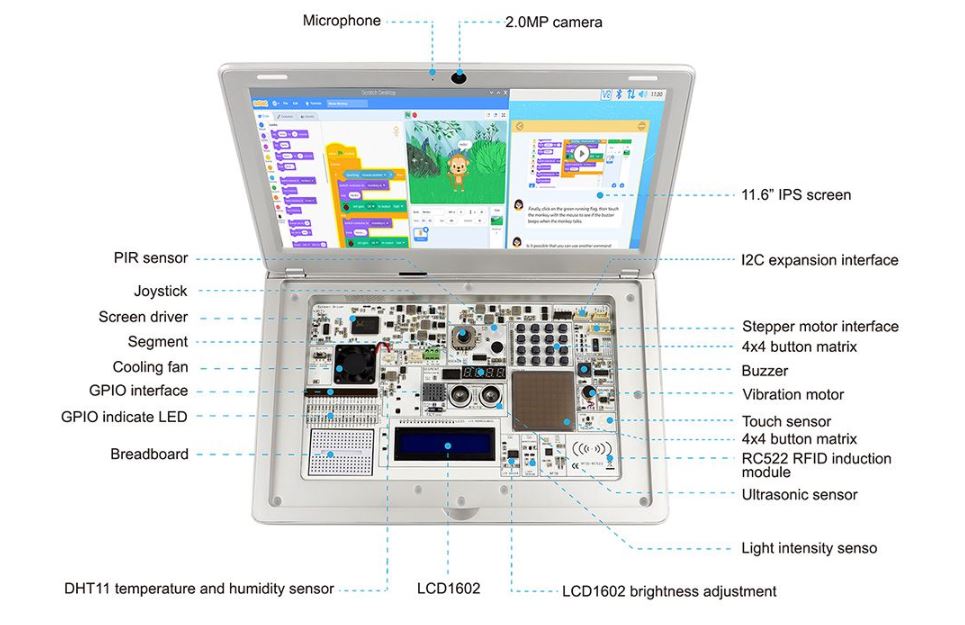
Imagine building a fruit piano, detecting motion to trigger alarms, or even creating AI projects that recognize faces and voices—all powered by the kit’s built-in sensors and easy-to-use software. The CrowPi 2 features an all-in-one board with 22 sensors, including buzzers for beeps, ultrasonic sensors for measuring distances, and RGB LEDs for colorful displays. These components connect seamlessly to the Raspberry Pi’s GPIO pins, allowing beginners to experiment without complicated wiring.
Features:
- 11.6-inch 1366*768 IPS screen.
- Sleek body made out of environmentally-friendly material, portable for on-the-go use.
- The wireless keyboard detaches from the body or stays connected via a magnet.
- Convert between playing and learning in the second.
- Get started via the one-step installation of Raspberry Pi 4B/5.
- 2-MP camera, microphone, and stereo output built-in.
- Switch between projects using one button and get creative using Raspberry PI GPIO pins, all of which connect to the onboard sensors or function as independent outputs.
- The All-in-one board includes all necessary sensors for learning hardware and software.
- Self-developed software for learning Scratch, Python, AI, and Minecraft step-by-step via an engaging dialogue teaching mode.
- Offline account management for saving learning progress and achievements and conveniently continuing education.

Specifications:
| Parameter | Value |
|---|---|
| Dimensions | 291×190×46mm. |
| Screen | 11.6-inch, 1366×768, IPS. |
| Camera | 2.0MP with microphone. |
| Power Supply | 5V/5A. |
| Power Port | Type-C. |
| Compatibility | Raspberry Pi 4B/5. |
| Audio Output | Stereo speaker. |
| Audio Port | 3.5mm headphone jack. |
| Keyboard | 2.4G wireless. |
| Mouse | 2.4G wireless. |
| Supported OS | Raspbian, Ubuntu, CentOS, etc. |
| Color | gray |
| Certifications | CE, FCC, RoHS. |
Configuration:

How to use:


Power On the Device
- Plug in the 5V power adapter (or connect a compatible USB power bank).
- Press the power button — the CrowPi 2 will start and boot into the operating system.
Start Learning and Coding
- Once the system boots, you can explore the preloaded tutorials: Scratch, Python, AI, and Minecraft coding lessons.
- Use the built-in camera, microphone, and 22 sensors for interactive projects.
- Save your progress through the offline account system so each learner can have their own workspace
Applications:
- Hands-on electronics and circuitry experiments (using the built-in breadboard and sensors).
- Learning programming and coding (Python, Scratch, game development).
- STEM education projects in schools or makerspaces (sensors, LEDs, motors).
- DIY robotics and automation (using servos, stepper motors and GPIO controls).
- Sensor-based monitoring projects (temperature, light, motion, distance).
- AI and machine-vision experiments (face/speech recognition demonstrations).
- Portable Raspberry Pi computing for learning on the go (laptop replacement for education).


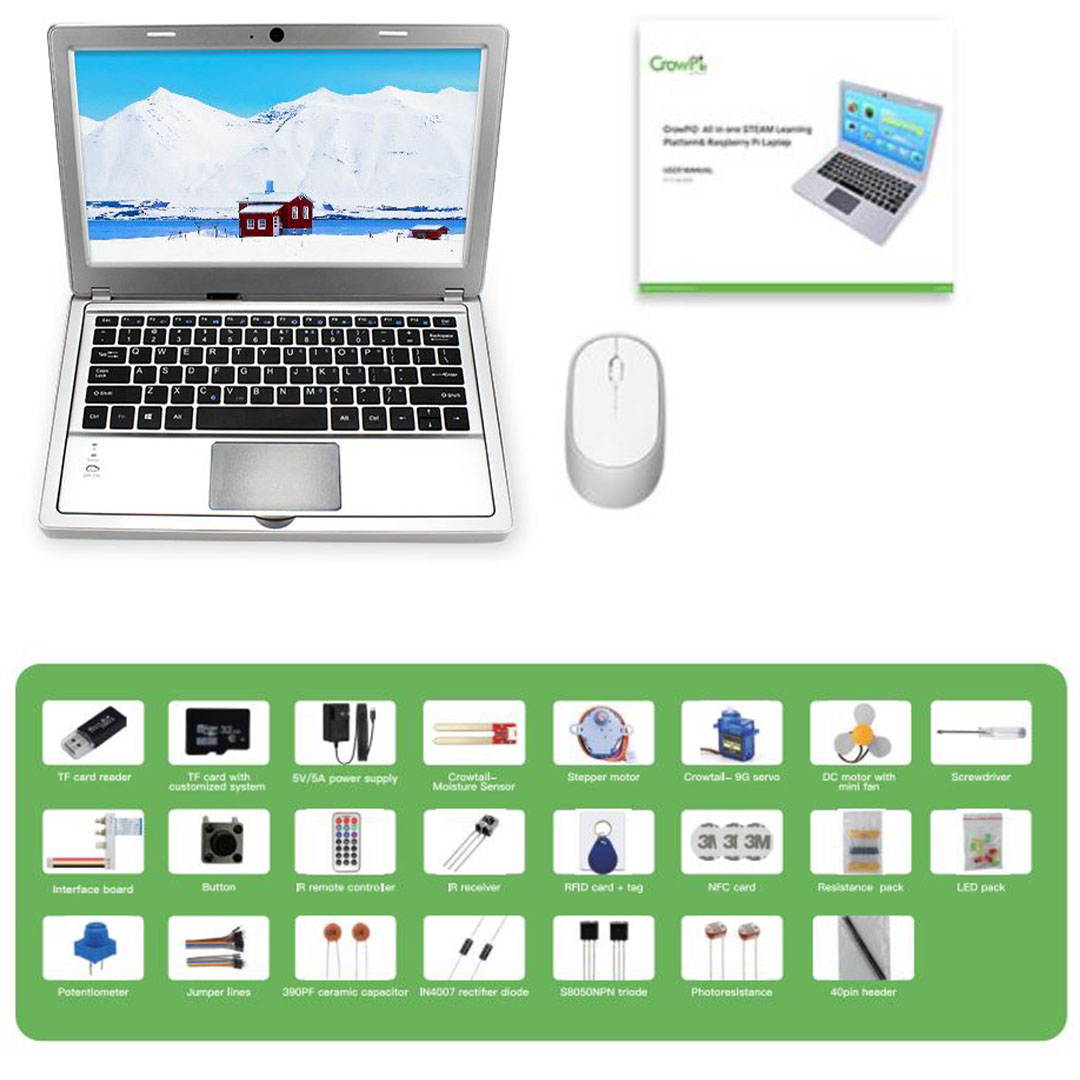
Package Include:
 Documents:
| Document | URL |
|---|---|
| Wiki | wiki |
| User manual (compatible with RPI 4/5) | User Manual |
| FCC Certification | Certification |
| CE Certification | Certification |
| Update the CrowPi2 OS Image | Drive |
Note: its important to read and understand the manual