



Robotics For kids
Contents List
- Introduction
- What Is Robotics for Kids?
- Why Is Robotics Important for Children?
- How Does a Robot Work?
- What Can Children Learn from Robotics?
- Robotics Programming for Kids
- Best Robotics Platforms for Beginners
- Robotics Projects for Kids
- Choosing Robotics Components for Children
- Safety Considerations When Learning Robotics
- How to Start Learning Robotics at Home
- How Robotics Prepares Children for the Future
- Frequently Asked Questions
- Conclusion
Time Reading is 20min.
1- Introduction
The global density of robots in workplaces has more than doubled in the last seven years, reaching an average of 162 robots per 10,000 human employees.
That number makes one thing clear. Robots aren’t coming someday. They’ve already started working alongside us. They assist surgeons in hospitals with precision tasks. Farms use robots to monitor crops and automate harvesting. Logistics companies rely on robotic systems to sort, move, and deliver goods faster than ever. Even daily life now runs on AI-powered machines, from voice assistants to automated home devices.
Therefore, Children growing up today will not see robots as something unusual. They will see them as part of normal work, normal systems, and normal life. Many of them will eventually work alongside these technologies, manage them, or build new ones.
Robotics for kids is much more than building a small robot that moves, turns, or avoids obstacles. It is a practical way of introducing children to engineering, electronics, programming, mathematics, physics, and problem-solving through hands-on projects.
A robot provides a simple but powerful learning environment. A child can write a program, connect a sensor, operate a motor, observe the result, identify a problem, and modify the design. This creates a direct connection between an idea and a physical result.
The goal of learning robotics at an early age is therefore not necessarily to turn every child into a professional robotics engineer. Instead, it is to develop the ability to understand systems, solve problems, experiment with technology, and turn ideas into working projects.
In simple terms, robotics is no longer an extracurricular activity. It is becoming a way to prepare children for the kind of world they will live in and grow up in.
2- What Is Robotics for Kids?
Robotics is an engineering field concerned with designing, building, programming, and operating machines that can perform physical tasks.
When adapted for children, robotics uses simplified hardware, software, and projects to introduce these concepts at an appropriate level.
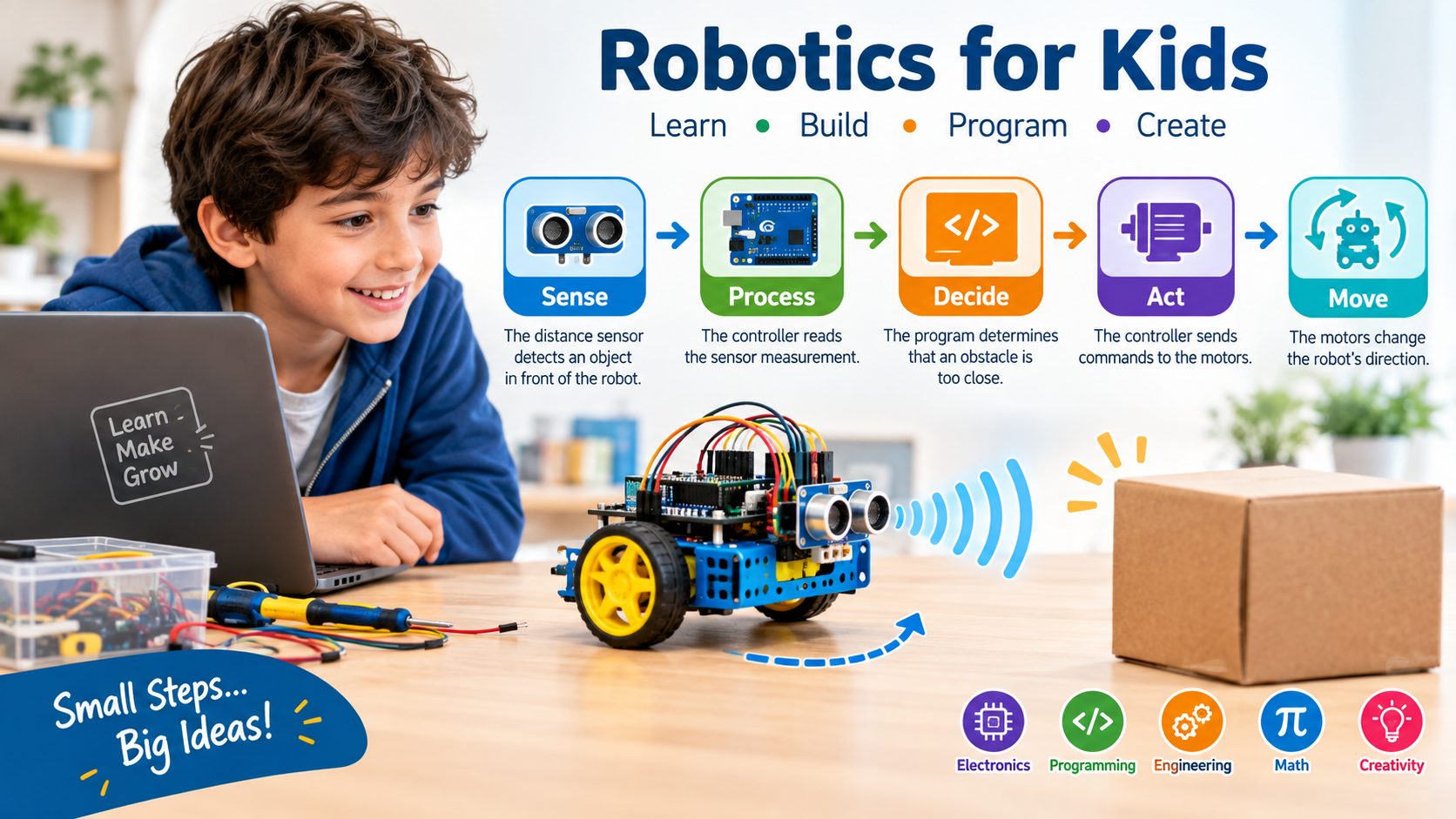
A basic educational robot can be viewed as a system with four important stages:
Sense → Process → Decide → Act
For example, consider a small obstacle-avoiding robot:
- A distance sensor detects an object in front of the robot.
- The controller reads the sensor measurement.
- The program determines that an obstacle is too close.
- The controller sends commands to the motors.
- The motors change the robot’s direction.
This simple example introduces the same fundamental concept found in much more sophisticated autonomous systems: input, processing, decision-making, and output.
Robotics therefore gives children an opportunity to understand how electronic and mechanical systems interact with software.
3- Why Is Robotics Important for Children?
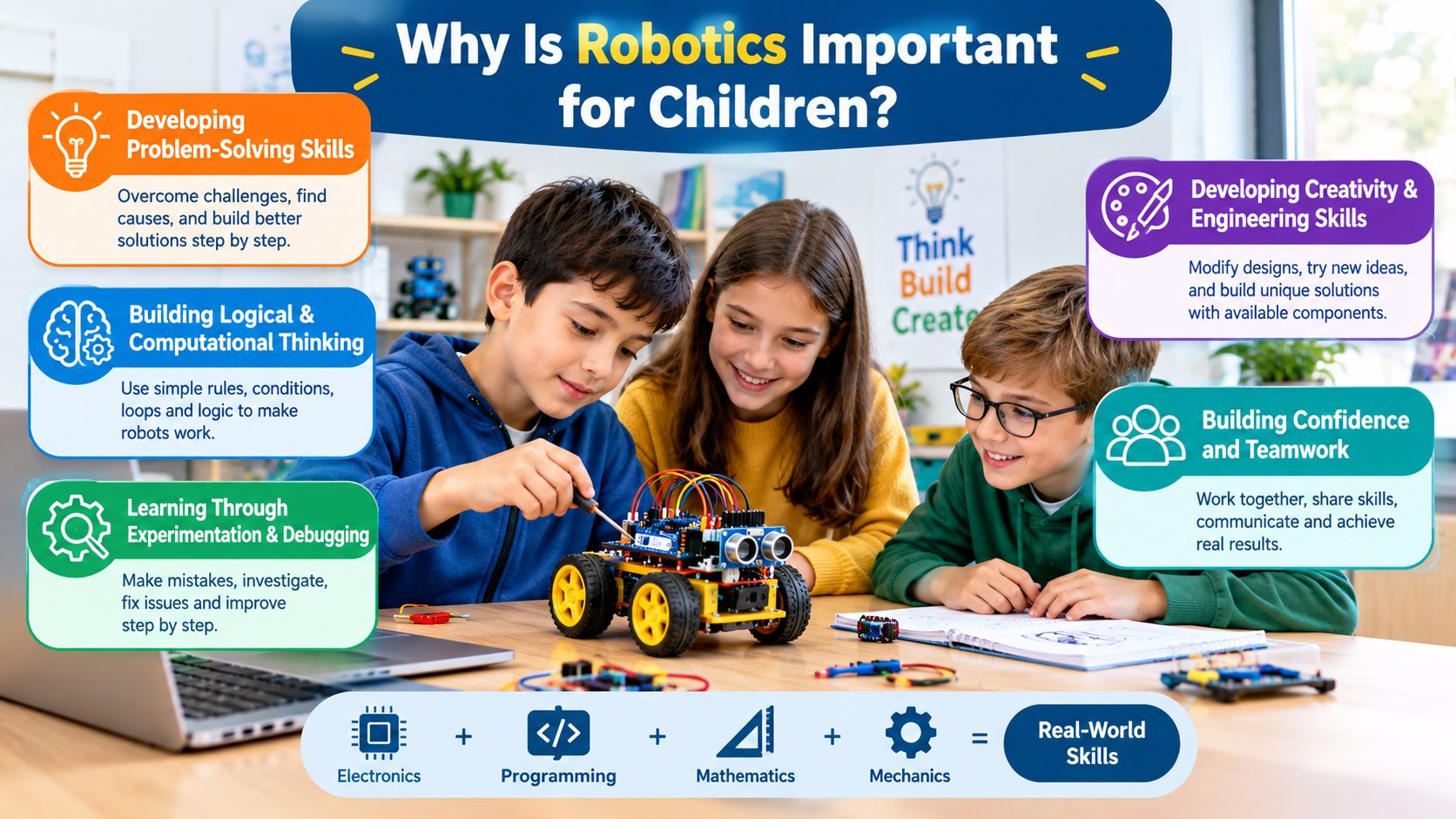
Robotics combines several areas of knowledge into one practical activity. Instead of studying electronics, programming, mathematics, and mechanics as completely separate subjects, children can see how these areas work together in a single project.
The educational value of robotics comes largely from this practical interaction.
Developing Problem-Solving Skills
Building a robot rarely works perfectly on the first attempt.
A robot may move too quickly, turn incorrectly, detect an obstacle too late, or fail to follow a line. Each problem creates an opportunity to investigate the cause and find a solution.
For example, if a line-following robot leaves the track, a child can investigate several possible causes:
- The sensor position may be incorrect.
- The sensor threshold may need adjustment.
- The motor speeds may be different.
- The program may contain an incorrect condition.
- The robot chassis may not be aligned properly.
This teaches children to divide a large problem into smaller problems instead of trying random solutions.
Building Logical and Computational Thinking
Robotics naturally introduces logical thinking.
A child can begin with simple rules such as:
- If an obstacle is detected, then stop.
- If the left sensor detects the line, then turn left.
- If the battery voltage is low, then reduce motor speed.
These simple conditions are the foundation of programming and automation.
As projects become more advanced, children can progress from simple if-then logic to variables, loops, functions, state machines, sensor fusion, and algorithm design.
Learning Through Experimentation and Debugging
One of the most valuable aspects of robotics is that mistakes produce visible results.
If a program contains an error, the robot may behave differently from what the child expected. Instead of treating the mistake simply as failure, the child can investigate what happened.
The basic process becomes:
Build → Program → Test → Observe → Debug → Improve
This is very similar to the engineering development process used when designing real electronic and robotic systems.
Developing Creativity and Engineering Skills
Robotics does not have to follow a single predefined design.
Children can modify the chassis, change the sensor arrangement, experiment with different wheels, redesign the robot’s mechanical structure, or create an entirely new application.
This encourages engineering creativity because the child is not simply following instructions. They begin asking:
“What can I build with these components?”
Building Confidence and Teamwork
Robotics projects can also be completed in teams.
One student may work on programming, another on electronics, and another on mechanical construction. They must communicate, test each other’s work, and combine their individual contributions into one functioning system.
Successfully making a robot perform a task can also provide an immediate sense of achievement because the result is physically visible.
4- How Does a Robot Work?
Although robots can become extremely complex, most educational robots can be explained using several fundamental components.
Understanding these components is one of the best ways for beginners to move from simply assembling a kit to actually understanding robotics.
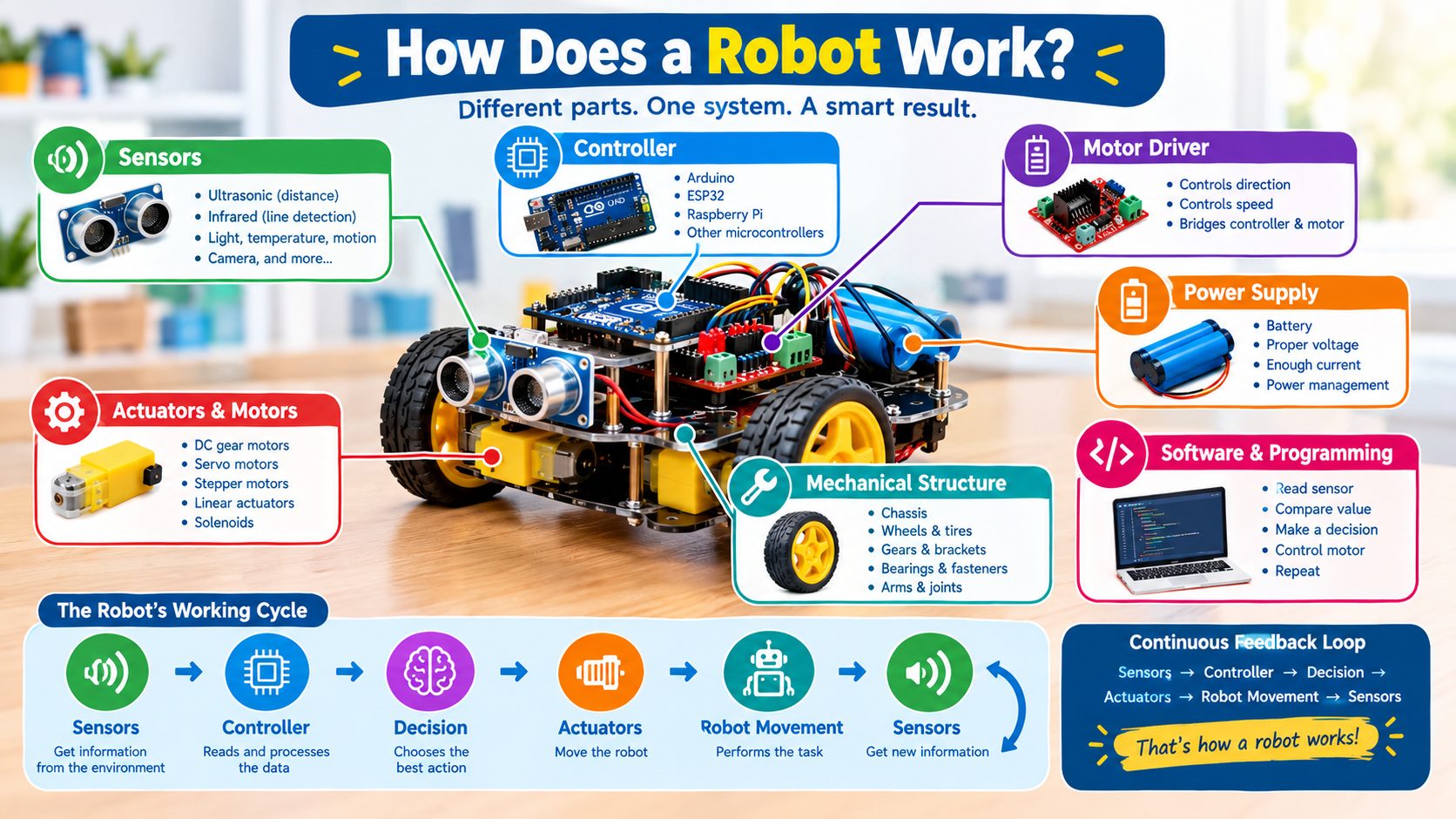
Controller
The controller is the electronic brain of the robot.
It executes the program and communicates with sensors, motor drivers, communication modules, and other electronic components.
Common controllers used in educational and hobby robotics include:
- Arduino boards
- ESP32-based boards
- Raspberry Pi computers
- Other microcontrollers
- Educational robotics controllers
A microcontroller is particularly useful for beginner projects because it can directly read sensors and control outputs with relatively simple programs.
Sensors
Sensors allow a robot to obtain information from its environment.
Depending on the project, a robot may use:
- Ultrasonic sensors for distance measurement
- Infrared sensors for line detection
- Light sensors for measuring brightness
- Temperature sensors
- Motion sensors
- Encoders for measuring wheel rotation
- Touch or limit switches
- Cameras for visual information
For example, an ultrasonic sensor can help a robot determine whether an object is located in front of it.
The important concept is that sensors provide information that the controller can process.
Actuators and Motors
Actuators allow the robot to physically interact with its environment.
In small mobile robots, DC gear motors are commonly used to rotate wheels.
Other robotics projects may use:
- Servo motors
- Stepper motors
- Linear actuators
- Solenoids
A servo motor, for example, can be useful when a robot needs controlled angular movement, such as moving a robotic arm joint.
Motor Drivers
A microcontroller generally cannot supply the current required to drive a motor directly.
A motor driver acts as an interface between the controller and the motor.
It allows the controller to control motor direction and, depending on the driver and motor type, speed as well.
This is an important concept for beginners because it demonstrates the difference between a control signal and the power required by an actuator.
Power Supply
Every robot requires a suitable power source.
The battery must provide appropriate voltage and enough current for the controller, sensors, motors, and other components.
Motor loads can produce significant current demand, particularly during starting or when the motor is mechanically loaded.
For this reason, choosing a suitable battery and power-management arrangement is an important part of robot design.
Mechanical Structure
Electronics alone cannot create a useful mobile robot.
The robot also needs a physical structure that holds its components together.
This may include:
- Robot chassis
- Wheels
- Tires
- Gears
- Motor brackets
- Bearings
- Screws and fasteners
- Mechanical arms or joints
Mechanical design affects stability, weight distribution, traction, and movement.
Software and Programming
Software tells the robot what to do.
The program may contain instructions such as:
- Read the sensor.
- Compare the sensor value with a threshold.
- Make a decision.
- Control the motor.
- Repeat the process.
This creates a continuous feedback loop:
Sensors → Controller → Decision → Actuators → Robot Movement → Sensors
This feedback concept is fundamental to autonomous robotics.
5- What Can Children Learn from Robotics?
Robotics can introduce children to several technical disciplines at the same time.

Electronics Fundamentals
Children can learn practical concepts such as:
- Voltage
- Current
- Resistance
- Digital signals
- Analog signals
- LEDs
- Switches
- Sensors
- Motors
- Batteries
- Basic circuits
Instead of learning these concepts only from diagrams, children can observe them in a functioning system.
Programming
Programming gives the robot its behavior.
Beginners can start with simple commands and gradually learn:
- Variables
- Conditions
- Loops
- Functions
- Libraries
- Sensor data processing
- Communication protocols
- Algorithms
The complexity can increase as the child’s experience develops.
Mechanical Design
Robotics also introduces basic mechanical engineering.
Children can explore:
- Gears
- Torque
- Speed
- Friction
- Balance
- Wheel diameter
- Weight distribution
- Structural strength
For example, increasing the gear reduction can increase available torque at the wheels while reducing rotational speed.
Mathematics and Physics
Robotics provides practical applications for mathematical and physical concepts.
A child can use mathematics to calculate:
- Distance traveled
- Wheel circumference
- Motor speed
- Turning angles
- Sensor thresholds
- Robot dimensions
Physics can be observed through concepts such as:
- Friction
- Force
- Torque
- Acceleration
- Balance
- Motion
STEM Integration
Robotics is particularly valuable because it combines:
Science + Technology + Engineering + Mathematics
This is why robotics is commonly associated with STEM education. The child is not simply learning individual subjects but applying them together to solve a physical problem.
6- Robotics Programming for Kids
Programming is one of the most important parts of robotics because it determines how the robot responds to its environment.
The appropriate programming method depends on the child’s age, experience, and selected platform.

Block-Based Programming
Block-based programming environments use visual blocks instead of requiring the child to type programming syntax.
This can be useful for young beginners because they can concentrate on programming logic without initially worrying about syntax errors.
Children can learn:
- Sequences
- Conditions
- Loops
- Events
- Variables
- Basic algorithms
Once they understand these concepts, moving to text-based programming becomes easier.
Text-Based Programming
Older children and more advanced learners can move to languages such as:
- C/C++
- Python
- MicroPython
Text-based programming provides greater control and introduces programming practices that are useful beyond robotics.
Arduino Programming
Arduino is widely used in educational and hobby robotics.
A typical Arduino robot program may read sensors and control motors based on predefined conditions.
Arduino is particularly suitable for beginners because the hardware and software ecosystem is accessible, while the same platform can also support more advanced projects.
MicroPython
MicroPython provides a Python-based programming environment for supported microcontrollers.
It can be an attractive option for learners who want to use Python concepts while working with embedded hardware.
Raspberry Pi Programming
Raspberry Pi computers can support more advanced robotics projects.
Because they run an operating system, they can handle applications involving:
- Python
- Cameras
- Computer vision
- Networking
- Data processing
- Artificial intelligence
A Raspberry Pi can therefore be useful when a project requires more computing power than a basic microcontroller can provide.
7- Best Robotics Platforms for Beginners
There is no single best robotics platform for every child. The correct choice depends on age, experience, project complexity, budget, and learning objectives.

Arduino
Arduino is an excellent starting point for learning the fundamentals of electronics and robotics.
It is suitable for projects involving:
- LEDs
- Sensors
- Motors
- Servos
- Line-following robots
- Obstacle-avoiding robots
- Simple automation
It is especially useful when the main goal is to understand how a microcontroller interacts with electronic hardware.
ESP32
ESP32 boards provide significantly more capabilities than many basic beginner microcontrollers.
Depending on the specific board, they can provide:
- Wi-Fi
- Bluetooth/BLE
- Multiple GPIO pins
- Analog inputs
- PWM
- Communication interfaces
This makes ESP32 useful for robotics projects involving wireless control, IoT, and connected devices.
Raspberry Pi
Raspberry Pi is more appropriate when a project requires a small computer rather than only a microcontroller.
It can be used for:
- Camera-based robots
- Computer vision
- Remote control
- Networking
- Python programming
- AI-related experiments
It is particularly useful for learners progressing toward more advanced robotics.
Educational Robotics Kits
Educational kits can simplify the learning process by providing compatible mechanical parts, electronics, sensors, motors, and instructions.
For beginners, a good kit should ideally allow the child to progress beyond the initial guided projects rather than limiting them to predetermined activities.
8- Robotics Projects for Kids
The best way to understand robotics is to build projects.
Projects should increase gradually in difficulty so that children develop confidence before moving to more complex systems.

Line Following Robot
A line-following robot uses sensors to detect a line on a surface and adjusts its motor movement to remain on the track.
This project introduces:
- Infrared sensors
- Sensor thresholds
- Motor control
- Conditional logic
- Feedback
- Basic autonomous navigation
It is an excellent project for understanding how sensor information can directly influence robot movement.
Obstacle Avoiding Robot
An obstacle-avoiding robot detects objects and changes direction when necessary.
A typical design may use an ultrasonic distance sensor.
The basic logic is:
Measure distance → Compare with threshold → Stop or turn → Continue
This project introduces environmental sensing and autonomous decision-making.
Bluetooth-Controlled Robot
A Bluetooth-controlled robot can receive commands from a smartphone or another wireless controller.
It introduces:
- Wireless communication
- Mobile control
- Serial communication
- Motor control
This project is useful because the child can immediately see how digital commands can control a physical machine.
Light-Following Robot
A light-following robot uses light sensors to determine the direction of a stronger light source.
The controller compares sensor readings and adjusts the motor speeds accordingly.
This demonstrates how a robot can use differences between sensor measurements to make movement decisions.
Robotic Arm
A robotic arm introduces a different type of movement compared with a mobile robot.
Children can explore:
- Servo motors
- Joints
- Mechanical linkages
- Position control
- Torque
- Coordinate concepts
A simple robotic arm can begin with manually controlled movements and later progress toward programmed sequences.
Smart Home Robotics Project
Robotics can also be connected with home automation.
A beginner project might monitor environmental conditions and control devices based on sensor readings.
For example:
Sensor detects condition → Controller processes data → Output device responds
This provides an introduction to automation and IoT concepts.
9- Choosing Robotics Components for Children
Selecting appropriate components is important because a project that is unnecessarily complicated can discourage beginners.

Choosing the Controller
For a basic robot, consider:
- Number of input/output pins
- Programming environment
- Processing requirements
- Communication capabilities
- Available libraries
- Community support
- Power requirements
For simple sensor-and-motor projects, an Arduino-compatible board may be sufficient.
For wireless projects, an ESP32 may be more suitable.
For camera-based or computationally intensive projects, Raspberry Pi may be the better choice.
Choosing Sensors
The sensor should match the robot’s task.
For example:
| Robot Task | Suitable Sensor |
|---|---|
| Detecting obstacles | Ultrasonic or ToF sensor |
| Following a line | Infrared reflectance sensor |
| Measuring light | Light sensor |
| Measuring temperature | Temperature sensor |
| Detecting rotation | Encoder |
| Recognizing visual objects | Camera |
The objective should always come first: choose the sensor based on what the robot needs to know.
Choosing Motors
The motor must match the mechanical requirements of the robot.
Important factors include:
- Voltage
- Current
- Speed
- Torque
- Gear ratio
- Physical size
For a small mobile robot, geared DC motors are often a practical option.
Choosing the Power Supply
The power source should be selected according to the voltage and current requirements of the complete system.
The designer should consider:
- Motor current
- Controller voltage
- Sensor requirements
- Battery capacity
- Runtime
- Voltage regulation
A common beginner mistake is selecting a battery based only on voltage while ignoring current capability and overall power requirements.
Choosing a Robot Chassis
A chassis should provide:
- Adequate mechanical strength
- Stable wheel placement
- Space for electronics
- Easy access for maintenance
- Appropriate weight distribution
A simple two-wheel drive or four-wheel drive chassis is often sufficient for beginner mobile robotics projects.
10- Safety Considerations When Learning Robotics
Robotics is generally an excellent hands-on learning activity, but basic safety practices should always be followed.

Children should receive appropriate supervision when working with:
- Batteries
- Soldering equipment
- Power supplies
- Rotating mechanisms
- Cutting tools
- Hot components
- High-current circuits
Beginners should also understand that rechargeable batteries must be used with appropriate chargers and protection systems.
Motors and moving mechanisms should be tested carefully to prevent fingers, wires, or loose objects from becoming trapped.
For younger children, it is preferable to start with low-voltage educational electronics and projects designed specifically for their age group.
Safety should be treated as part of engineering rather than as something added after the project is completed.
11- How to Start Learning Robotics at Home
Learning robotics does not require an advanced laboratory.
A beginner can start with a simple development board, a few electronic components, sensors, motors, and a basic chassis.

A practical learning path can be:
Step 1: Learn basic electronics
Understand voltage, current, resistance, LEDs, switches, and simple circuits.
Step 2: Learn basic programming
Start with variables, conditions, loops, and functions.
Step 3: Control simple outputs
Make an LED turn on and off or control a buzzer.
Step 4: Read sensors
Connect a sensor and display or use its readings.
Step 5: Control a motor
Learn why a motor driver is required and experiment with motor speed and direction.
Step 6: Build a simple robot
Combine the controller, sensors, motor driver, motors, battery, and chassis.
Step 7: Add autonomous behavior
Program the robot to react to sensor information.
Step 8: Improve the design
Modify the mechanical structure, software, sensor placement, and control algorithm.
This gradual approach is generally more effective than starting immediately with a complicated autonomous robot.
12- How Robotics Prepares Children for the Future
Robotics provides skills that extend beyond robotics itself.
A child who learns to build and debug a robot is also learning how to approach complex problems systematically.

The experience can develop:
- Logical thinking
- Problem-solving
- Programming skills
- Engineering awareness
- Creativity
- Mathematical reasoning
- Collaboration
- Project management
- Technical communication
Robotics can also provide an early introduction to technologies that are increasingly important in modern engineering, including automation, embedded systems, artificial intelligence, computer vision, and autonomous systems.
The original article emphasizes a similar point: robotics exposure can help children become familiar with technologies that are increasingly present in workplaces and everyday life.
However, robotics education should not be presented as simply preparing children for a particular job. Its greater value is teaching them how to think, experiment, build, test, and improve.
13- Frequently Asked Questions
What age is suitable for starting robotics?
There is no single correct age. Younger children can begin with simple construction and visual programming, while older students can progress toward Arduino, ESP32, Raspberry Pi, Python, electronics, and autonomous robotics.
The important factor is matching the complexity of the project to the learner’s abilities.
Is robotics difficult for beginners?
Robotics can appear complicated because it combines mechanical, electronic, and software components. However, beginners do not need to learn everything at once.
Starting with a simple project and gradually adding sensors, motors, and programming concepts makes robotics much easier to understand.
Does a child need to know programming before learning robotics?
No.
Robotics can actually be an effective way to introduce programming. Children can begin with simple visual programming or very basic code and gradually develop their programming skills through practical projects.
Is Arduino good for kids?
Arduino can be an excellent educational platform when the project and components are appropriate for the child’s age and experience.
It provides a relatively simple way to learn about microcontrollers, sensors, motors, and programming.
Is Raspberry Pi better than Arduino for robotics?
Neither platform is universally better.
Arduino is generally well suited to direct hardware control and simple embedded robotics projects. Raspberry Pi is more appropriate when the project requires an operating system, networking, cameras, substantial data processing, or advanced software.
What is the easiest robotics project for a beginner?
A simple obstacle-avoiding robot or line-following robot is a good starting point because it demonstrates the complete robotics cycle:
Sensor → Controller → Program → Motor → Movement
Can robotics help children learn electronics?
Yes.
Robotics provides practical opportunities to understand circuits, sensors, motors, power supplies, digital signals, and microcontrollers.
Can robotics be learned at home?
Yes.
Many beginner robotics projects can be built at home using commercially available development boards, sensors, motors, chassis kits, and programming software.
14- Conclusion
Robotics for kids is not simply about building machines. It is a practical learning method that combines electronics, programming, mechanics, mathematics, physics, creativity, and problem-solving into one hands-on activity.
A simple robot can teach a child how sensors collect information, how a controller processes that information, how software makes decisions, and how motors transform electrical commands into physical movement.
As children progress, simple projects such as line-following and obstacle avoidance can lead to more advanced subjects such as wireless communication, robotic arms, computer vision, autonomous navigation, IoT, and artificial intelligence.
For beginners and young hobbyists, the most important principle is to start small, build something that works, understand why it works, and then improve it.
That approach transforms robotics from a collection of electronic components into an engineering learning experience.
For an electronics-focused store such as Makers Electronics robotics education also provides an excellent bridge between individual components and complete systems. A child who starts by controlling an LED can eventually progress to sensors, motors, microcontrollers, autonomous robots, and more sophisticated engineering projects.
The ultimate objective is not simply to make a robot move.
It is to help learners develop the confidence and technical mindset to turn an idea into a working system.
الروبوتات للأطفال
قائمة المحتويات
- مقدمة
- ما المقصود بالروبوتات للأطفال؟
- لماذا تُعد الروبوتات مهمة للأطفال؟
- كيف يعمل الروبوت؟
- ماذا يمكن للأطفال تعلمه من الروبوتات؟
- برمجة الروبوتات للأطفال
- أفضل منصات الروبوتات للمبتدئين
- مشروعات روبوتات مناسبة للأطفال
- اختيار مكونات الروبوت المناسبة للأطفال
- اعتبارات السلامة عند تعلم الروبوتات
- كيف يبدأ الطفل تعلم الروبوتات في المنزل؟
- كيف تهيئ الروبوتات الأطفال للمستقبل؟
- الأسئلة الشائعة
- الخلاصة
مدة القراءة حوالي : 20 دقيقة
1- مقدمة
تجاوزت كثافة الروبوتات في أماكن العمل عالميًا الضعف خلال السنوات السبع الماضية، لتصل في المتوسط إلى 162 روبوتًا لكل 10,000 موظف بشري.
وهذا الرقم يوضح أمرًا مهمًا: الروبوتات ليست تقنية ستظهر في المستقبل فقط، بل بدأت بالفعل العمل إلى جانب البشر. فهي تساعد الجراحين في المستشفيات على تنفيذ المهام الدقيقة، وتستخدمها المزارع لمراقبة المحاصيل وأتمتة عمليات الحصاد، وتعتمد عليها شركات الخدمات اللوجستية في فرز البضائع ونقلها وتسليمها بسرعة أكبر. وحتى الحياة اليومية أصبحت تعتمد على آلات مدعومة بالذكاء الاصطناعي، بدءًا من المساعدات الصوتية ووصولًا إلى الأجهزة المنزلية الآلية.
لذلك، فإن الأطفال الذين ينشأون اليوم لن ينظروا إلى الروبوتات باعتبارها شيئًا غريبًا، بل سيجدونها جزءًا من العمل والأنظمة والحياة اليومية. وسيعمل كثير منهم مستقبلًا إلى جانب هذه التقنيات أو يديرونها أو يساهمون في تطوير تقنيات جديدة.
الروبوتات للأطفال ليست مجرد نشاط لبناء روبوت صغير يتحرك أو يغير اتجاهه أو يتجنب العوائق. إنها وسيلة عملية لتعريف الأطفال بالهندسة والإلكترونيات والبرمجة والرياضيات والفيزياء وحل المشكلات من خلال مشروعات عملية.
يوفر الروبوت بيئة تعليمية بسيطة لكنها قوية. يستطيع الطفل كتابة برنامج، وتوصيل مستشعر، وتشغيل محرك، ومراقبة النتيجة، واكتشاف المشكلة، ثم تعديل التصميم. وبهذه الطريقة يتكوّن ارتباط مباشر بين الفكرة والنتيجة المادية التي تظهر أمامه.
لا يهدف تعلم الروبوتات في سن مبكرة بالضرورة إلى تحويل كل طفل إلى مهندس روبوتات محترف، بل إلى تنمية قدرته على فهم الأنظمة وحل المشكلات وتجربة التقنيات وتحويل الأفكار إلى مشروعات تعمل فعليًا.
ببساطة، لم تعد الروبوتات مجرد نشاط إضافي خارج المنهج، بل أصبحت وسيلة تساعد على إعداد الأطفال للعالم الذي سيعيشون وينشأون فيه.
2- ما المقصود بالروبوتات للأطفال؟
الروبوتات هي مجال هندسي يهتم بتصميم الآلات وبنائها وبرمجتها وتشغيلها لتنفيذ مهام مادية.
وعند تقديم هذا المجال للأطفال، يتم تبسيط الأجهزة والبرمجيات والمشروعات حتى تصبح المفاهيم مناسبة لأعمارهم ومستوياتهم التعليمية.
يمكن النظر إلى الروبوت التعليمي الأساسي باعتباره نظامًا يمر بأربع مراحل مهمة:
استشعار ← معالجة ← اتخاذ قرار ← تنفيذ
على سبيل المثال، لنفترض وجود روبوت صغير يتجنب العوائق:
- يكتشف مستشعر المسافة وجود جسم أمام الروبوت.
- يقرأ المتحكم قياس المستشعر.
- يحدد البرنامج أن العائق قريب جدًا.
- يرسل المتحكم أوامر إلى المحركات.
- تغيّر المحركات اتجاه الروبوت.
يقدم هذا المثال البسيط الفكرة الأساسية نفسها الموجودة في الأنظمة المستقلة الأكثر تطورًا: المدخلات، والمعالجة، واتخاذ القرار، والمخرجات.
لذلك تتيح الروبوتات للأطفال فرصة فهم كيفية تفاعل الأنظمة الإلكترونية والميكانيكية مع البرمجيات.
3- لماذا تُعد الروبوتات مهمة للأطفال؟
تجمع الروبوتات عدة مجالات معرفية داخل نشاط عملي واحد. فبدلًا من دراسة الإلكترونيات والبرمجة والرياضيات والميكانيكا كمواد منفصلة تمامًا، يستطيع الأطفال رؤية كيفية عمل هذه المجالات معًا داخل مشروع واحد.
وتأتي القيمة التعليمية للروبوتات بدرجة كبيرة من هذا التفاعل العملي.
تنمية مهارات حل المشكلات
نادراً ما يعمل الروبوت بالشكل المثالي من المحاولة الأولى.
قد يتحرك الروبوت بسرعة زائدة، أو يغير اتجاهه بشكل خاطئ، أو يكتشف العائق متأخرًا، أو يفشل في تتبع الخط. وكل مشكلة تمنح الطفل فرصة للبحث عن السبب والوصول إلى حل.
على سبيل المثال، إذا خرج روبوت تتبع الخط عن المسار، يمكن للطفل فحص عدة أسباب محتملة:
- قد يكون موضع المستشعر غير صحيح.
- قد يحتاج حد المستشعر إلى ضبط.
- قد تختلف سرعات المحركات.
- قد يحتوي البرنامج على شرط غير صحيح.
- قد لا يكون هيكل الروبوت مضبوط المحاذاة بشكل صحيح.
وهذا يعلّم الطفل تقسيم المشكلة الكبيرة إلى مشكلات أصغر بدلًا من تجربة حلول عشوائية.
بناء التفكير المنطقي والحاسوبي
تقدم الروبوتات التفكير المنطقي بصورة طبيعية.
يمكن للطفل البدء بقواعد بسيطة مثل:
- إذا تم اكتشاف عائق، فتوقف.
- إذا اكتشف المستشعر الأيسر الخط، فاستدر إلى اليسار.
- إذا انخفض جهد البطارية، فقلل سرعة المحرك.
هذه الشروط البسيطة تمثل أساس البرمجة والأتمتة.
ومع زيادة تعقيد المشروعات، يمكن للأطفال الانتقال من منطق «إذا-فإن» البسيط إلى المتغيرات والحلقات والدوال وآلات الحالات ودمج بيانات المستشعرات وتصميم الخوارزميات.
التعلم من خلال التجربة وتصحيح الأخطاء
من أكثر الجوانب قيمة في الروبوتات أن الأخطاء تنتج نتائج يمكن رؤيتها مباشرة.
إذا احتوى البرنامج على خطأ، فقد يتصرف الروبوت بطريقة مختلفة عما توقعه الطفل. وبدلًا من اعتبار الخطأ فشلًا فقط، يمكن للطفل البحث في ما حدث وفهم سببه.
بناء ← برمجة ← اختبار ← ملاحظة ← تصحيح ← تحسين
وهذا يشبه إلى حد كبير عملية التطوير الهندسي المستخدمة عند تصميم الأنظمة الإلكترونية والروبوتية الحقيقية.
تنمية الإبداع والمهارات الهندسية
لا تحتاج الروبوتات إلى الالتزام بتصميم واحد محدد مسبقًا.
يمكن للأطفال تعديل الهيكل، وتغيير ترتيب المستشعرات، وتجربة عجلات مختلفة، وإعادة تصميم البنية الميكانيكية للروبوت، أو ابتكار تطبيق جديد بالكامل.
وهذا يشجع الإبداع الهندسي لأن الطفل لا يكتفي باتباع التعليمات، بل يبدأ في طرح سؤال مهم:
«ماذا يمكنني أن أبني باستخدام هذه المكونات؟»
بناء الثقة والعمل الجماعي
يمكن تنفيذ مشروعات الروبوتات ضمن فرق أيضًا.
قد يعمل أحد الطلاب على البرمجة، بينما يتولى آخر الإلكترونيات، ويعمل ثالث على البناء الميكانيكي. ويحتاج الفريق إلى التواصل واختبار عمل كل عضو ودمج المساهمات الفردية في نظام واحد يعمل.
كما أن نجاح الطفل في جعل الروبوت ينفذ مهمة معينة يمنحه شعورًا مباشرًا بالإنجاز لأن النتيجة تظهر أمامه بصورة ملموسة.
4- كيف يعمل الروبوت؟
رغم أن الروبوتات قد تصبح شديدة التعقيد، فإن معظم الروبوتات التعليمية يمكن فهمها من خلال مجموعة من المكونات الأساسية.
ويُعد فهم هذه المكونات من أفضل الطرق التي تساعد المبتدئين على الانتقال من مجرد تجميع مجموعة روبوت إلى فهم كيفية عمل الروبوتات فعليًا.
المتحكم
المتحكم هو العقل الإلكتروني للروبوت.
فهو ينفذ البرنامج ويتواصل مع المستشعرات، ووحدات قيادة المحركات، ووحدات الاتصال، والمكونات الإلكترونية الأخرى.
من أمثلة المتحكمات الشائعة في الروبوتات التعليمية والهوايات الإلكترونية:
- لوحات Arduino
- اللوحات المبنية على ESP32
- أجهزة Raspberry Pi
- متحكمات دقيقة أخرى
- متحكمات الروبوتات التعليمية
يُعد المتحكم الدقيق مفيدًا بشكل خاص في مشروعات المبتدئين لأنه يستطيع قراءة المستشعرات والتحكم في المخرجات مباشرة باستخدام برامج بسيطة نسبيًا.
المستشعرات
تتيح المستشعرات للروبوت الحصول على معلومات من البيئة المحيطة به.
وبحسب المشروع، قد يستخدم الروبوت:
- مستشعرات فوق صوتية لقياس المسافة
- مستشعرات الأشعة تحت الحمراء لاكتشاف الخط
- مستشعرات الضوء لقياس شدة الإضاءة
- مستشعرات درجة الحرارة
- مستشعرات الحركة
- المشفّرات لقياس دوران العجلات
- مفاتيح اللمس أو مفاتيح الحد
- الكاميرات للحصول على المعلومات المرئية
على سبيل المثال، يمكن للمستشعر فوق الصوتي مساعدة الروبوت على تحديد ما إذا كان هناك جسم أمامه.
والفكرة الأساسية هي أن المستشعرات توفر معلومات يستطيع المتحكم معالجتها.
المشغلات والمحركات
تتيح المشغلات للروبوت التفاعل فعليًا مع البيئة المحيطة به.
في الروبوتات المتحركة الصغيرة، تُستخدم محركات تيار مستمر مزودة بتروس بشكل شائع لتدوير العجلات.
وقد تستخدم مشروعات أخرى:
- محركات السيرفو
- المحركات الخطوية
- المشغلات الخطية
- الملفات اللولبية
فمثلًا يمكن استخدام محرك سيرفو عندما يحتاج الروبوت إلى حركة زاوية مضبوطة، مثل تحريك مفصل في ذراع روبوتية.
وحدات قيادة المحركات
لا يستطيع المتحكم الدقيق عادةً توفير التيار اللازم لتشغيل المحرك مباشرة.
تعمل وحدة قيادة المحرك كواجهة بين المتحكم والمحرك.
وتتيح للمتحكم التحكم في اتجاه دوران المحرك، وكذلك سرعته بحسب نوع وحدة القيادة والمحرك.
وهذا مفهوم مهم للمبتدئين لأنه يوضح الفرق بين إشارة التحكم والقدرة الكهربائية المطلوبة لتشغيل المشغل.
مصدر الطاقة
يحتاج كل روبوت إلى مصدر طاقة مناسب.
يجب أن توفر البطارية جهدًا مناسبًا وتيارًا كافيًا للمتحكم والمستشعرات والمحركات وبقية المكونات.
وقد تتطلب الأحمال التي تمثلها المحركات تيارًا مرتفعًا، خصوصًا عند بدء التشغيل أو عندما يكون المحرك تحت حمل ميكانيكي.
لذلك، يعد اختيار البطارية المناسبة وترتيب إدارة الطاقة جزءًا مهمًا من تصميم الروبوت.
الهيكل الميكانيكي
لا تستطيع الإلكترونيات وحدها إنشاء روبوت متحرك مفيد.
يحتاج الروبوت أيضًا إلى هيكل مادي يثبت المكونات معًا.
وقد يشمل ذلك:
- هيكل الروبوت
- العجلات
- الإطارات
- التروس
- حوامل المحركات
- المحامل
- البراغي والمثبتات
- الأذرع أو المفاصل الميكانيكية
ويؤثر التصميم الميكانيكي في الثبات وتوزيع الوزن وقوة الاحتكاك والحركة.
البرمجيات والبرمجة
تخبر البرمجيات الروبوت بما يجب أن يفعله.
وقد يتضمن البرنامج تعليمات مثل:
- قراءة المستشعر.
- مقارنة قيمة المستشعر بحد معين.
- اتخاذ قرار.
- التحكم في المحرك.
- تكرار العملية.
المستشعرات ← المتحكم ← القرار ← المشغلات ← حركة الروبوت ← المستشعرات
ويُعد مفهوم التغذية الراجعة هذا أساسًا مهمًا في الروبوتات المستقلة.
5- ماذا يمكن للأطفال تعلمه من الروبوتات؟
أساسيات الإلكترونيات
يمكن للأطفال تعلم مفاهيم عملية مثل:
- الجهد
- التيار
- المقاومة
- الإشارات الرقمية
- الإشارات التناظرية
- مصابيح LED
- المفاتيح
- المستشعرات
- المحركات
- البطاريات
- الدوائر الأساسية
وبدلًا من تعلم هذه المفاهيم من الرسومات فقط، يستطيع الأطفال ملاحظتها داخل نظام يعمل فعليًا.
البرمجة
تمنح البرمجة الروبوت سلوكه.
يمكن للمبتدئين البدء بأوامر بسيطة ثم تعلم:
- المتغيرات
- الشروط
- الحلقات
- الدوال
- المكتبات
- معالجة بيانات المستشعرات
- بروتوكولات الاتصال
- الخوارزميات
ويمكن زيادة مستوى التعقيد مع تطور خبرة الطفل.
التصميم الميكانيكي
تقدم الروبوتات أيضًا مقدمة إلى الهندسة الميكانيكية الأساسية.
يمكن للأطفال استكشاف:
- التروس
- عزم الدوران
- السرعة
- الاحتكاك
- التوازن
- قطر العجلة
- توزيع الوزن
- المتانة الهيكلية
فعلى سبيل المثال، يمكن أن تؤدي زيادة تخفيض التروس إلى رفع عزم الدوران المتاح عند العجلات مع تقليل السرعة الدورانية.
الرياضيات والفيزياء
توفر الروبوتات تطبيقات عملية للمفاهيم الرياضية والفيزيائية.
يمكن للطفل استخدام الرياضيات لحساب:
- المسافة المقطوعة
- محيط العجلة
- سرعة المحرك
- زوايا الدوران
- حدود المستشعرات
- أبعاد الروبوت
ويمكن ملاحظة مفاهيم الفيزياء من خلال:
- الاحتكاك
- القوة
- عزم الدوران
- التسارع
- التوازن
- الحركة
دمج مجالات STEM
تتميز الروبوتات بقيمتها التعليمية لأنها تجمع بين:
العلوم + التكنولوجيا + الهندسة + الرياضيات
ولهذا ترتبط الروبوتات عادةً بتعليم STEM. فالطفل لا يتعلم مواد منفصلة فقط، بل يطبقها معًا لحل مشكلة مادية واقعية.
6- برمجة الروبوتات للأطفال
تُعد البرمجة من أهم أجزاء الروبوتات لأنها تحدد كيفية استجابة الروبوت للبيئة المحيطة به.
وتعتمد طريقة البرمجة المناسبة على عمر الطفل وخبرته والمنصة التي يختارها.
البرمجة القائمة على الكتل
تستخدم بيئات البرمجة القائمة على الكتل كتلًا مرئية بدلًا من كتابة الصياغة البرمجية يدويًا.
وهذا مفيد للمبتدئين الصغار لأنهم يستطيعون التركيز على منطق البرمجة دون القلق في البداية بشأن أخطاء الصياغة.
يمكن للأطفال تعلم:
- التسلسل
- الشروط
- الحلقات
- الأحداث
- المتغيرات
- الخوارزميات الأساسية
وبعد فهم هذه المفاهيم يصبح الانتقال إلى البرمجة النصية أسهل.
البرمجة النصية
يمكن للأطفال الأكبر سنًا والمتعلمين الأكثر تقدمًا الانتقال إلى لغات مثل:
- C/C++
- Python
- MicroPython
وتوفر البرمجة النصية تحكمًا أكبر، كما تقدم ممارسات برمجية مفيدة خارج مجال الروبوتات.
برمجة Arduino
تُستخدم Arduino على نطاق واسع في الروبوتات التعليمية والهوايات الإلكترونية.
وقد يقرأ برنامج روبوت Arduino النموذجي المستشعرات ويتحكم في المحركات بناءً على شروط محددة مسبقًا.
وتناسب Arduino المبتدئين بشكل خاص لأن منظومة الأجهزة والبرمجيات فيها سهلة الوصول، وفي الوقت نفسه يمكن استخدام المنصة في مشروعات أكثر تقدمًا.
MicroPython
توفر MicroPython بيئة برمجة مبنية على Python للمتحكمات الدقيقة التي تدعمها.
وقد تكون خيارًا جذابًا للمتعلمين الذين يرغبون في استخدام مفاهيم Python أثناء العمل مع الأجهزة المضمنة.
برمجة Raspberry Pi
يمكن لأجهزة Raspberry Pi دعم مشروعات روبوتية أكثر تقدمًا.
وبما أنها تعمل بنظام تشغيل، فيمكنها التعامل مع تطبيقات تشمل:
- Python
- الكاميرات
- الرؤية الحاسوبية
- الشبكات
- معالجة البيانات
- الذكاء الاصطناعي
لذلك يمكن أن تكون Raspberry Pi مفيدة عندما يتطلب المشروع قدرة حوسبة أكبر مما يستطيع متحكم دقيق أساسي توفيره.
7- أفضل منصات الروبوتات للمبتدئين
لا توجد منصة روبوتات واحدة هي الأفضل لكل طفل. فالاختيار الصحيح يعتمد على العمر والخبرة وتعقيد المشروع والميزانية والأهداف التعليمية.
Arduino
تُعد Arduino نقطة بداية ممتازة لتعلم أساسيات الإلكترونيات والروبوتات.
وهي مناسبة لمشروعات تشمل:
- مصابيح LED
- المستشعرات
- المحركات
- محركات السيرفو
- روبوتات تتبع الخط
- روبوتات تجنب العوائق
- الأتمتة البسيطة
وتكون مفيدة بشكل خاص عندما يكون الهدف الأساسي هو فهم كيفية تفاعل المتحكم الدقيق مع المكونات الإلكترونية.
ESP32
توفر لوحات ESP32 إمكانات أكبر بكثير من كثير من المتحكمات الأساسية المخصصة للمبتدئين.
وبحسب نوع اللوحة، قد توفر:
- Wi-Fi
- Bluetooth/BLE
- عدة منافذ GPIO
- مداخل تناظرية
- PWM
- واجهات اتصال
وهذا يجعل ESP32 مناسبة لمشروعات الروبوتات التي تتضمن التحكم اللاسلكي وإنترنت الأشياء والأجهزة المتصلة.
Raspberry Pi
تكون Raspberry Pi أكثر ملاءمة عندما يحتاج المشروع إلى حاسوب صغير بدلًا من متحكم دقيق فقط.
ويمكن استخدامها في:
- الروبوتات المعتمدة على الكاميرات
- الرؤية الحاسوبية
- التحكم عن بُعد
- الشبكات
- برمجة Python
- تجارب مرتبطة بالذكاء الاصطناعي
وهي مفيدة بشكل خاص للمتعلمين الذين ينتقلون إلى مستويات أكثر تقدمًا في الروبوتات.
أطقم الروبوتات التعليمية
يمكن للأطقم التعليمية تبسيط عملية التعلم من خلال توفير أجزاء ميكانيكية متوافقة وإلكترونيات ومستشعرات ومحركات وتعليمات.
وبالنسبة للمبتدئين، من الأفضل أن يتيح الطقم للطفل الانتقال إلى مشروعات جديدة بعد الانتهاء من الأنشطة الموجهة الأولى، بدلًا من تقييده بأنشطة محددة مسبقًا.
8- مشروعات روبوتات مناسبة للأطفال
أفضل طريقة لفهم الروبوتات هي بناء المشروعات.
ويُفضّل أن تزداد صعوبة المشروعات تدريجيًا حتى يكتسب الأطفال الثقة قبل الانتقال إلى الأنظمة الأكثر تعقيدًا.
روبوت تتبع الخط
يستخدم روبوت تتبع الخط مستشعرات لاكتشاف خط على سطح معين، ثم يضبط حركة المحركات ليبقى على المسار.
يعرّف هذا المشروع الطفل على:
- المستشعرات التي تعمل بالأشعة تحت الحمراء
- حدود المستشعرات
- التحكم في المحركات
- المنطق الشرطي
- التغذية الراجعة
- الملاحة الذاتية الأساسية
وهو مشروع ممتاز لفهم كيفية تأثير معلومات المستشعرات مباشرة في حركة الروبوت.
روبوت تجنب العوائق
يكتشف روبوت تجنب العوائق الأجسام ويغير اتجاهه عند الحاجة.
وقد يستخدم التصميم النموذجي مستشعر مسافة فوق صوتي.
المنطق الأساسي هو:
قياس المسافة ← مقارنة الحد ← التوقف أو الدوران ← الاستمرار
يقدم هذا المشروع مفهوم استشعار البيئة واتخاذ القرارات بشكل مستقل.
روبوت يتم التحكم فيه عبر Bluetooth
يمكن لروبوت يتم التحكم فيه عبر Bluetooth استقبال الأوامر من هاتف ذكي أو وحدة تحكم لاسلكية أخرى.
ويعرّف هذا المشروع الطفل على:
- الاتصال اللاسلكي
- التحكم عبر الهاتف
- الاتصال التسلسلي
- التحكم في المحركات
وتكمن فائدته في أن الطفل يرى مباشرة كيف يمكن للأوامر الرقمية التحكم في آلة مادية.
روبوت يتبع الضوء
يستخدم روبوت تتبع الضوء مستشعرات ضوئية لتحديد اتجاه مصدر الضوء الأقوى.
يقارن المتحكم بين قراءات المستشعرات ويضبط سرعات المحركات وفقًا لذلك.
ويوضح هذا كيفية استخدام الفروق بين قياسات المستشعرات لاتخاذ قرارات الحركة.
ذراع روبوتية
تقدم الذراع الروبوتية نوعًا مختلفًا من الحركة مقارنة بالروبوت المتحرك.
يمكن للأطفال استكشاف:
- محركات السيرفو
- المفاصل
- الوصلات الميكانيكية
- التحكم في الموضع
- عزم الدوران
- مفاهيم الإحداثيات
ويمكن أن تبدأ الذراع الروبوتية البسيطة بحركات يتم التحكم فيها يدويًا، ثم تتطور لاحقًا إلى تسلسلات مبرمجة.
مشروع روبوتات للمنزل الذكي
يمكن أيضًا ربط الروبوتات بالأتمتة المنزلية.
قد يبدأ المشروع للمبتدئ بمراقبة الظروف البيئية والتحكم في الأجهزة بناءً على قراءات المستشعرات.
على سبيل المثال:
المستشعر يكتشف حالة معينة ← المتحكم يعالج البيانات ← جهاز الإخراج يستجيب
ويقدم هذا مقدمة إلى مفاهيم الأتمتة وإنترنت الأشياء.
9- اختيار مكونات الروبوت المناسبة للأطفال
يُعد اختيار المكونات المناسبة أمرًا مهمًا، لأن المشروع المعقد دون داعٍ قد يجعل المبتدئ يشعر بالإحباط.
اختيار المتحكم
عند اختيار روبوت أساسي، ضع في الاعتبار:
- عدد منافذ الإدخال والإخراج
- بيئة البرمجة
- متطلبات المعالجة
- إمكانات الاتصال
- المكتبات المتاحة
- دعم المجتمع
- متطلبات الطاقة
بالنسبة لمشروعات المستشعرات والمحركات البسيطة، قد تكون لوحة متوافقة مع Arduino كافية.
أما للمشروعات اللاسلكية، فقد يكون ESP32 أكثر ملاءمة.
وبالنسبة للمشروعات التي تعتمد على الكاميرا أو تتطلب معالجة مكثفة، فقد تكون Raspberry Pi هي الخيار الأفضل.
اختيار المستشعرات
يجب أن يتوافق المستشعر مع المهمة التي سينفذها الروبوت.
على سبيل المثال:
اختيار المحركات
يجب أن يتوافق المحرك مع المتطلبات الميكانيكية للروبوت.
ومن العوامل المهمة:
- الجهد
- التيار
- السرعة
- عزم الدوران
- نسبة التروس
- الحجم الفعلي
بالنسبة للروبوت المتحرك الصغير، غالبًا ما تكون محركات التيار المستمر المزودة بتروس خيارًا عمليًا.
اختيار مصدر الطاقة
يجب اختيار مصدر الطاقة وفقًا لمتطلبات الجهد والتيار للنظام بالكامل.
وعلى المصمم مراعاة:
- تيار المحركات
- جهد المتحكم
- متطلبات المستشعرات
- سعة البطارية
- مدة التشغيل
- تنظيم الجهد
من الأخطاء الشائعة لدى المبتدئين اختيار البطارية اعتمادًا على الجهد فقط، مع تجاهل قدرتها على توفير التيار ومتطلبات الطاقة الكلية للنظام.
اختيار هيكل الروبوت
يجب أن يوفر الهيكل:
- قوة ميكانيكية كافية
- توزيعًا ثابتًا للعجلات
- مساحة للإلكترونيات
- سهولة الوصول إلى المكونات للصيانة
- توزيعًا مناسبًا للوزن
غالبًا ما يكون هيكل الدفع بعجلتين أو أربع عجلات كافيًا لمشروعات الروبوتات المتحركة للمبتدئين.
| مهمة الروبوت | المستشعر المناسب |
|---|---|
| اكتشاف العوائق | مستشعر فوق صوتي أو ToF |
| تتبع الخط | مستشعر انعكاس بالأشعة تحت الحمراء |
| قياس الضوء | مستشعر ضوء |
| قياس درجة الحرارة | مستشعر درجة حرارة |
| اكتشاف الدوران | مشفّر Encoder |
| التعرف على الأجسام بصريًا | كاميرا |
يجب أن يكون الهدف هو نقطة البداية دائمًا: اختر المستشعر بناءً على ما يحتاج الروبوت إلى معرفته.
10- اعتبارات السلامة عند تعلم الروبوتات
تُعد الروبوتات نشاطًا عمليًا ممتازًا للتعلم، لكن يجب دائمًا اتباع قواعد السلامة الأساسية.
يجب أن يحصل الأطفال على الإشراف المناسب عند التعامل مع:
- البطاريات
- معدات اللحام
- مصادر الطاقة
- الآليات الدوارة
- أدوات القطع
- المكونات الساخنة
- دوائر التيار المرتفع
كما يجب أن يفهم المبتدئون أن البطاريات القابلة لإعادة الشحن يجب استخدامها مع شواحن وأنظمة حماية مناسبة.
ويجب اختبار المحركات والآليات المتحركة بحذر لمنع انحشار الأصابع أو الأسلاك أو الأجسام غير المثبتة.
وبالنسبة للأطفال الأصغر سنًا، يفضّل البدء بالإلكترونيات التعليمية منخفضة الجهد والمشروعات المصممة خصيصًا للفئة العمرية المناسبة.
يجب التعامل مع السلامة باعتبارها جزءًا من الهندسة، وليس أمرًا يُضاف بعد الانتهاء من المشروع.
11- كيف تبدأ تعلّم الروبوتات في المنزل؟
لا يحتاج تعلّم الروبوتات إلى مختبر متطور أو تجهيزات معقدة؛ إذ يمكن للمبتدئ البدء باستخدام لوحة تطوير بسيطة، وعدد قليل من المكونات الإلكترونية، وبعض المستشعرات والمحركات، وهيكل أساسي للروبوت.
يمكنك اتباع مسار تعليمي تدريجي يساعدك على اكتساب المهارات الأساسية خطوة بخطوة:
الخطوة الأولى: تعلّم أساسيات الإلكترونيات
ابدأ بفهم الجهد الكهربائي والتيار والمقاومة، وتعرّف على مصابيح LED والمفاتيح والدوائر الكهربائية البسيطة.
الخطوة الثانية: تعلّم أساسيات البرمجة
تدرّب على استخدام المتغيرات والشروط والحلقات البرمجية والدوال، فهي من أهم اللبنات الأساسية لكتابة البرامج.
الخطوة الثالثة: التحكّم في المخرجات البسيطة
ابدأ بتشغيل مصباح LED وإطفائه باستخدام البرنامج، أو جرّب التحكّم في جرس إلكتروني لإصدار صوت عند تحقق شرط معين.
الخطوة الرابعة: قراءة بيانات المستشعرات
وصّل أحد المستشعرات بلوحة التحكم، ثم تعلّم كيفية قراءة البيانات التي يرسلها وعرضها أو الاستفادة منها داخل البرنامج.
الخطوة الخامسة: التحكّم في المحركات
تعلّم لماذا تحتاج المحركات عادةً إلى دائرة قيادة مناسبة، ثم جرّب تغيير سرعة المحرك واتجاه دورانه.
الخطوة السادسة: بناء روبوت بسيط
اجمع لوحة التحكم والمستشعرات ودائرة قيادة المحركات والمحركات والبطارية والهيكل الميكانيكي لتكوين روبوت متكامل.
الخطوة السابعة: إضافة سلوك ذاتي للروبوت
طوّر البرنامج ليتمكن الروبوت من الاستجابة لبيانات المستشعرات، مثل تغيير اتجاهه عند اكتشاف عائق أمامه.
الخطوة الثامنة: تحسين التصميم
استمر في تطوير المشروع من خلال تعديل الهيكل الميكانيكي، وتحسين البرنامج، وتغيير أماكن المستشعرات، وتطوير خوارزمية التحكم.
يُعد هذا التدرّج في التعلّم أكثر فاعلية في العادة من البدء مباشرةً ببناء روبوت مستقل ومعقد؛ لأنه يمنح المبتدئ فرصة لفهم كل جزء واكتساب الثقة قبل الانتقال إلى المشروعات الأكثر تقدمًا.
12- كيف تهيّئ الروبوتات الأطفال للمستقبل؟
تساعد الروبوتات الأطفال على اكتساب مهارات تتجاوز مجال الروبوتات نفسه. فعندما يتعلّم الطفل بناء روبوت واكتشاف أخطائه وإصلاحها، فإنه يتدرّب أيضًا على التعامل مع المشكلات المعقدة بطريقة منظمة ومنهجية.
يمكن أن تسهم هذه التجربة في تنمية مجموعة متنوعة من المهارات، من أبرزها:
- التفكير المنطقي.
- القدرة على حل المشكلات.
- مهارات البرمجة.
- فهم المبادئ الهندسية.
- الإبداع والابتكار.
- التفكير الرياضي.
- العمل الجماعي والتعاون.
- إدارة المشروعات.
- التواصل التقني وشرح الأفكار.
كما تمنح الروبوتات الأطفال فرصة مبكرة للتعرّف على تقنيات تزداد أهميتها في الهندسة الحديثة، مثل الأتمتة والأنظمة المدمجة والذكاء الاصطناعي والرؤية الحاسوبية والأنظمة ذاتية التشغيل.
وتساعد هذه الخبرات الأطفال على فهم التقنيات التي أصبحت جزءًا من الحياة اليومية وبيئات العمل الحديثة، والتعامل معها بثقة ووعي أكبر.
ومع ذلك، لا ينبغي اختزال تعليم الروبوتات في إعداد الأطفال لوظيفة معينة في المستقبل؛ فقيمته الأهم تتمثل في تنمية قدرتهم على التفكير والتجربة والبناء والاختبار والتحسين، وهي مهارات يمكن الاستفادة منها في مجالات عديدة طوال حياتهم.
13- الأسئلة الشائعة
ما العمر المناسب لبدء تعلم الروبوتات؟
لا يوجد عمر واحد مناسب للجميع. يمكن للأطفال الأصغر سنًا البدء بالبناء البسيط والبرمجة المرئية، بينما يستطيع الطلاب الأكبر سنًا الانتقال إلى Arduino وESP32 وRaspberry Pi وPython والإلكترونيات والروبوتات المستقلة.
والعامل الأهم هو أن يتناسب تعقيد المشروع مع قدرات المتعلم.
هل الروبوتات صعبة على المبتدئين؟
قد تبدو الروبوتات معقدة لأنها تجمع بين المكونات الميكانيكية والإلكترونية والبرمجية. لكن المبتدئ لا يحتاج إلى تعلم كل شيء في الوقت نفسه.
يساعد البدء بمشروع بسيط ثم إضافة المستشعرات والمحركات ومفاهيم البرمجة تدريجيًا على جعل الروبوتات أسهل بكثير في الفهم.
هل يحتاج الطفل إلى معرفة البرمجة قبل تعلم الروبوتات؟
لا.
يمكن أن تكون الروبوتات في الواقع وسيلة فعالة لتقديم البرمجة. يستطيع الأطفال البدء ببرمجة مرئية بسيطة أو تعليمات برمجية أساسية جدًا، ثم تطوير مهاراتهم من خلال المشروعات العملية.
هل Arduino مناسبة للأطفال؟
يمكن أن تكون Arduino منصة تعليمية ممتازة عندما يكون المشروع والمكونات مناسبين لعمر الطفل وخبرته.
وهي توفر طريقة بسيطة نسبيًا لتعلم المتحكمات الدقيقة والمستشعرات والمحركات والبرمجة.
هل Raspberry Pi أفضل من Arduino للروبوتات؟
لا توجد منصة أفضل بشكل مطلق.
تتناسب Arduino عمومًا مع التحكم المباشر في الأجهزة والمشروعات الروبوتية المضمنة البسيطة، بينما تكون Raspberry Pi أنسب عندما يحتاج المشروع إلى نظام تشغيل أو شبكات أو كاميرات أو معالجة بيانات كبيرة أو برمجيات متقدمة.
ما أسهل مشروع روبوت للمبتدئ؟
يُعد روبوت بسيط لتجنب العوائق أو تتبع الخط نقطة بداية جيدة لأنه يوضح دورة الروبوتات الكاملة:
المستشعر ← المتحكم ← البرنامج ← المحرك ← الحركة
هل يمكن للروبوتات مساعدة الأطفال على تعلم الإلكترونيات؟
نعم.
توفر الروبوتات فرصًا عملية لفهم الدوائر والمستشعرات والمحركات ومصادر الطاقة والإشارات الرقمية والمتحكمات الدقيقة.
هل يمكن تعلم الروبوتات في المنزل؟
نعم.
يمكن بناء كثير من مشروعات الروبوتات للمبتدئين في المنزل باستخدام لوحات تطوير متاحة تجاريًا ومستشعرات ومحركات وهياكل روبوت وبرمجيات للبرمجة.
14- الخلاصة
الروبوتات للأطفال ليست مجرد بناء آلات، بل هي طريقة تعليمية عملية تجمع الإلكترونيات والبرمجة والميكانيكا والرياضيات والفيزياء والإبداع وحل المشكلات في نشاط عملي واحد.
يمكن لروبوت بسيط أن يعلّم الطفل كيف تجمع المستشعرات المعلومات، وكيف يعالج المتحكم هذه المعلومات، وكيف تتخذ البرمجيات القرارات، وكيف تحول المحركات الأوامر الكهربائية إلى حركة فعلية.
ومع تقدم الأطفال، يمكن لمشروعات بسيطة مثل تتبع الخط وتجنب العوائق أن تقود إلى موضوعات أكثر تقدمًا مثل الاتصال اللاسلكي، والأذرع الروبوتية، والرؤية الحاسوبية، والملاحة الذاتية، وإنترنت الأشياء، والذكاء الاصطناعي.
بالنسبة للمبتدئين والهواة الصغار، فإن أهم مبدأ هو: ابدأ بمشروع صغير، وابنِ شيئًا يعمل، وافهم سبب عمله، ثم طوّره.
بهذه الطريقة تتحول الروبوتات من مجرد مجموعة من المكونات الإلكترونية إلى تجربة تعليمية هندسية متكاملة.
وبالنسبة إلى متجر يركز على الإلكترونيات مثل Makers Electronics، يوفر تعليم الروبوتات أيضًا جسرًا ممتازًا بين المكونات الفردية والأنظمة المتكاملة. فالطفل الذي يبدأ بالتحكم في مصباح LED يمكنه الانتقال تدريجيًا إلى المستشعرات والمحركات والمتحكمات الدقيقة والروبوتات المستقلة ومشروعات هندسية أكثر تطورًا.
الهدف النهائي ليس مجرد جعل الروبوت يتحرك، بل مساعدة المتعلمين على بناء الثقة وتطوير عقلية تقنية تمكنهم من تحويل الفكرة إلى نظام يعمل فعليًا.


Leave a comment
You must be logged in to post a comment.