


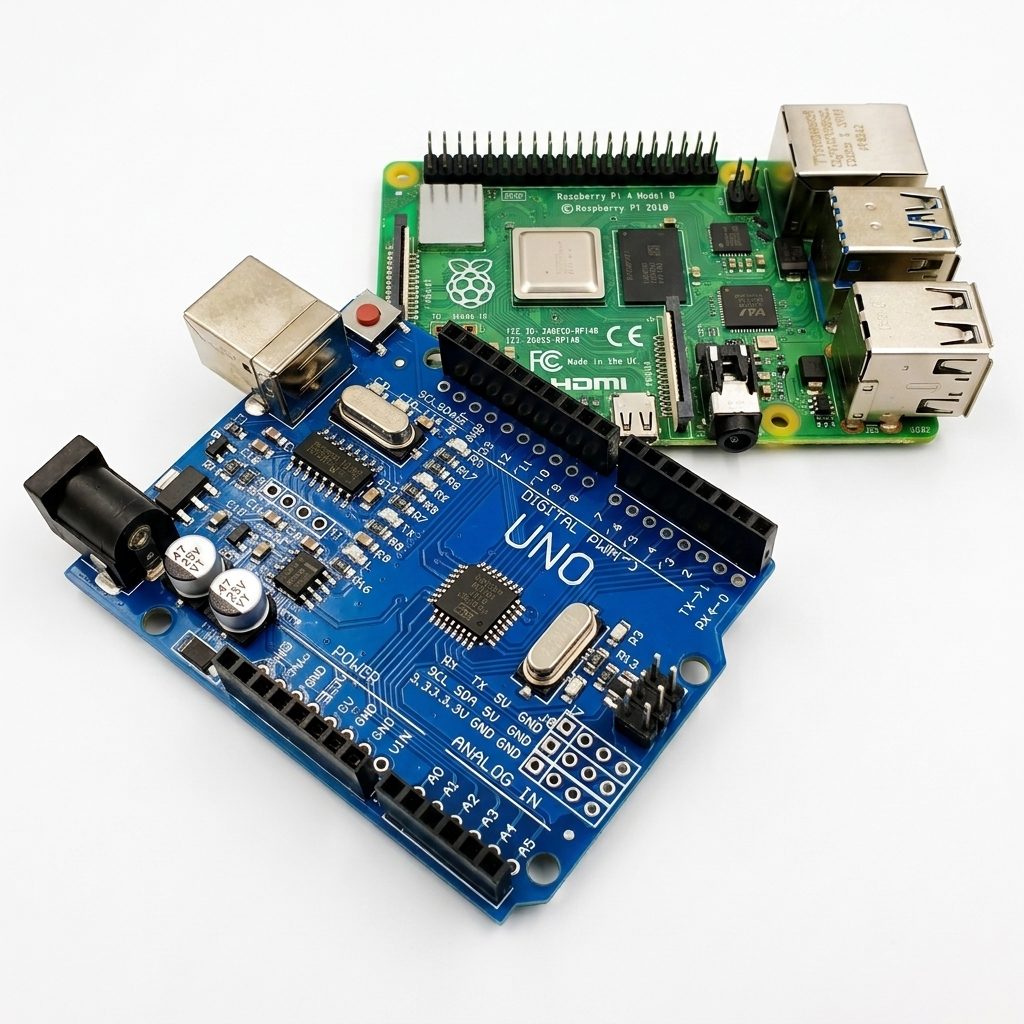
Arduino or Raspberry Pi? Where to start?
Contents List
- Introduction.
- Arduino or Raspberry Pi: The Quick Answer.
- What Is Arduino?
- What Is Raspberry Pi?
- Arduino vs Raspberry Pi: What Is the Main Difference?
- Microcontroller vs Single-Board Computer.
- Arduino vs Raspberry Pi Comparison Table.
- Which One Is Easier for Beginners?
- Arduino for Learning Electronics.
- Raspberry Pi for Learning Programming.
- Arduino vs Raspberry Pi for Programming.
- Arduino vs Raspberry Pi for Sensors and Hardware.
- Arduino vs Raspberry Pi for Robotics.
- Arduino vs Raspberry Pi for IoT Projects.
- Arduino vs Raspberry Pi for Smart Home Projects.
- Arduino vs Raspberry Pi for Camera and AI Projects.
- Power Consumption and Battery Projects.
- Cost and Required Components.
- What Projects Can You Build with Arduino?
- What Projects Can You Build with Raspberry Pi?
- Can Arduino and Raspberry Pi Work Together?
- When Should You Choose Arduino?
- When Should You Choose Raspberry Pi?
- Arduino or Raspberry Pi: Which One Should You Learn First?
- A Recommended Learning Path for Beginners.
- Common Beginner Mistakes When Choosing a Platform.
- Frequently Asked Questions.
- Conclusion.
Reading Time is 20 minute
1. Introduction
Arduino and Raspberry Pi are two popular platforms serving different purposes.
Arduino is microcontroller based, ideal for simple electronic projects, sensor and motor control, and other hardware focused applications. It stands out for being low cost and low power.
On the other hand, Raspberry Pi is a fully fledged computer suitable for more complex applications such as software development, media playback, web servers, and IoT projects. It runs a Linux based operating system and offers more connectivity options.
In summary, Arduino is preferred for simple electronic and control projects, while Raspberry Pi is preferred for more comprehensive projects that require computer power.
2. Arduino or Raspberry Pi: The Quick Answer
This section should immediately answer the reader’s question.
For example:
- Choose Arduino if you want to learn electronics, sensors, LEDs, motors, relays, and embedded systems.
- Choose Raspberry Pi if you want to learn Linux, Python, networking, cameras, servers, and software projects.
This gives readers a quick decision before reading the detailed explanation.
3. What Is Arduino?
Explain:
- Arduino is a microcontroller platform.
- It is designed to interact directly with electronic hardware.
- It runs a program repeatedly.
- It normally does not require a full operating system.
- It can read inputs and control outputs.
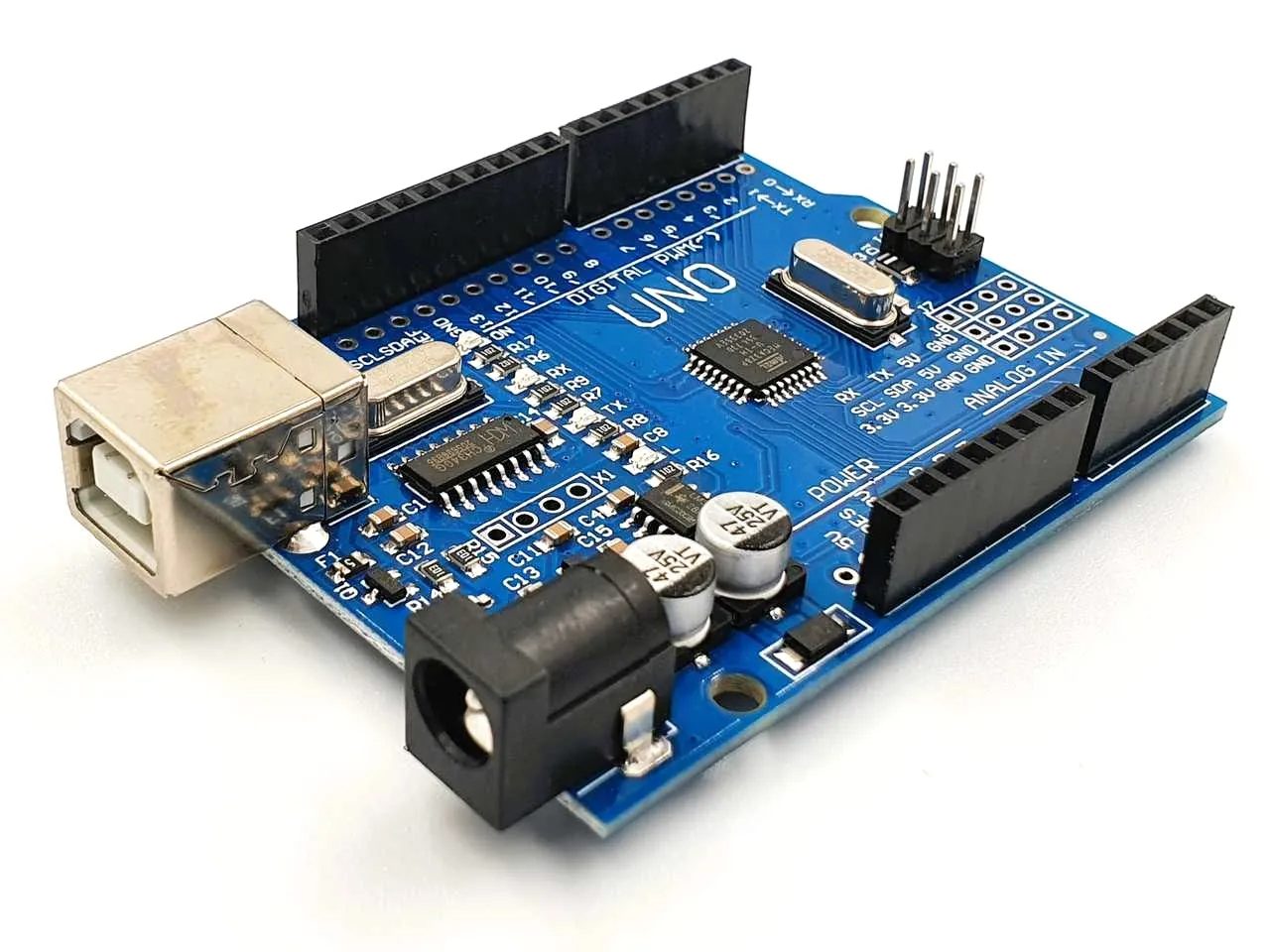
Examples of hardware:
- LEDs.
- Buttons.
- Sensors.
- Motors.
- Servo motors.
- Relays.
- Displays.
- Communication modules.
4. What Is Raspberry Pi?
Explain:
- Raspberry Pi is a single-board computer.
- It can run Linux.
- It has more processing capability than a typical Arduino board.
- It can run multiple programs.
- It can connect to networks and peripherals.
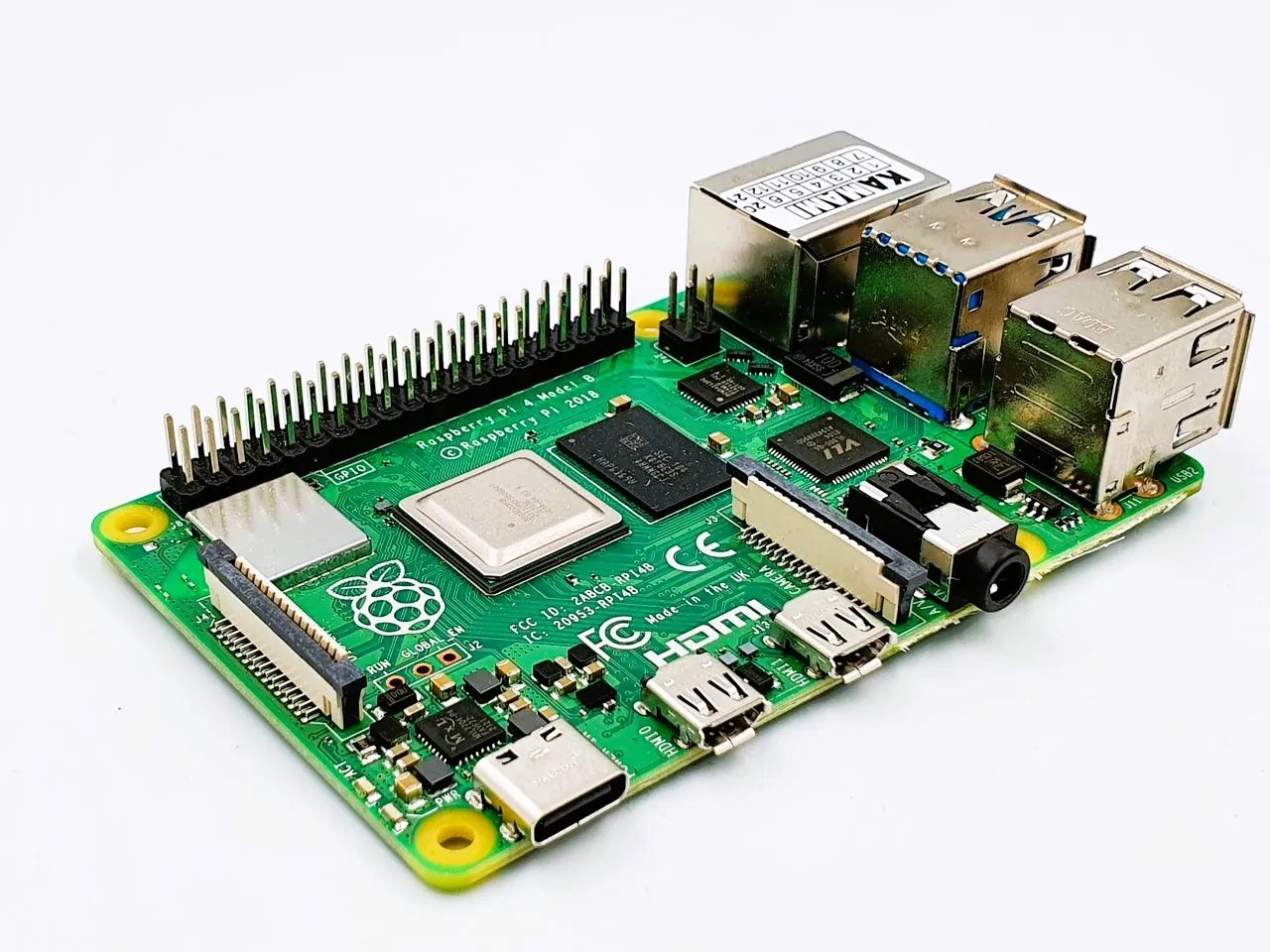
Examples:
- Keyboard.
- Mouse.
- Monitor.
- Camera.
- Wi-Fi.
- Ethernet.
5. Arduino vs Raspberry Pi: What Is the Main Difference?
This is one of the most important sections.
Clearly explain:
Arduino:
Designed mainly for:
- Direct hardware control.
- Embedded systems.
- Real-time tasks.
- Sensors.
- Motors.
Raspberry Pi:
Designed mainly for:
- Computing.
- Operating systems.
- Software.
- Networking.
- Advanced processing.
The reference article identifies this fundamental distinction as the central difference between the two platforms.
6. Microcontroller vs Single-Board Computer
This section is essential for beginners.
Explain the difference simply.
Microcontroller
A microcontroller:
- Runs a dedicated program.
- Directly controls hardware.
- Uses relatively low power.
- Is suitable for embedded applications.
Single-Board Computer
A single-board computer:
- Runs an operating system.
- Can run multiple applications.
- Has more processing power.
- Supports advanced software applications.
This section will help the reader understand why Arduino and Raspberry Pi behave differently.
7. Arduino vs Raspberry Pi Comparison Table
Include a simple comparison table.
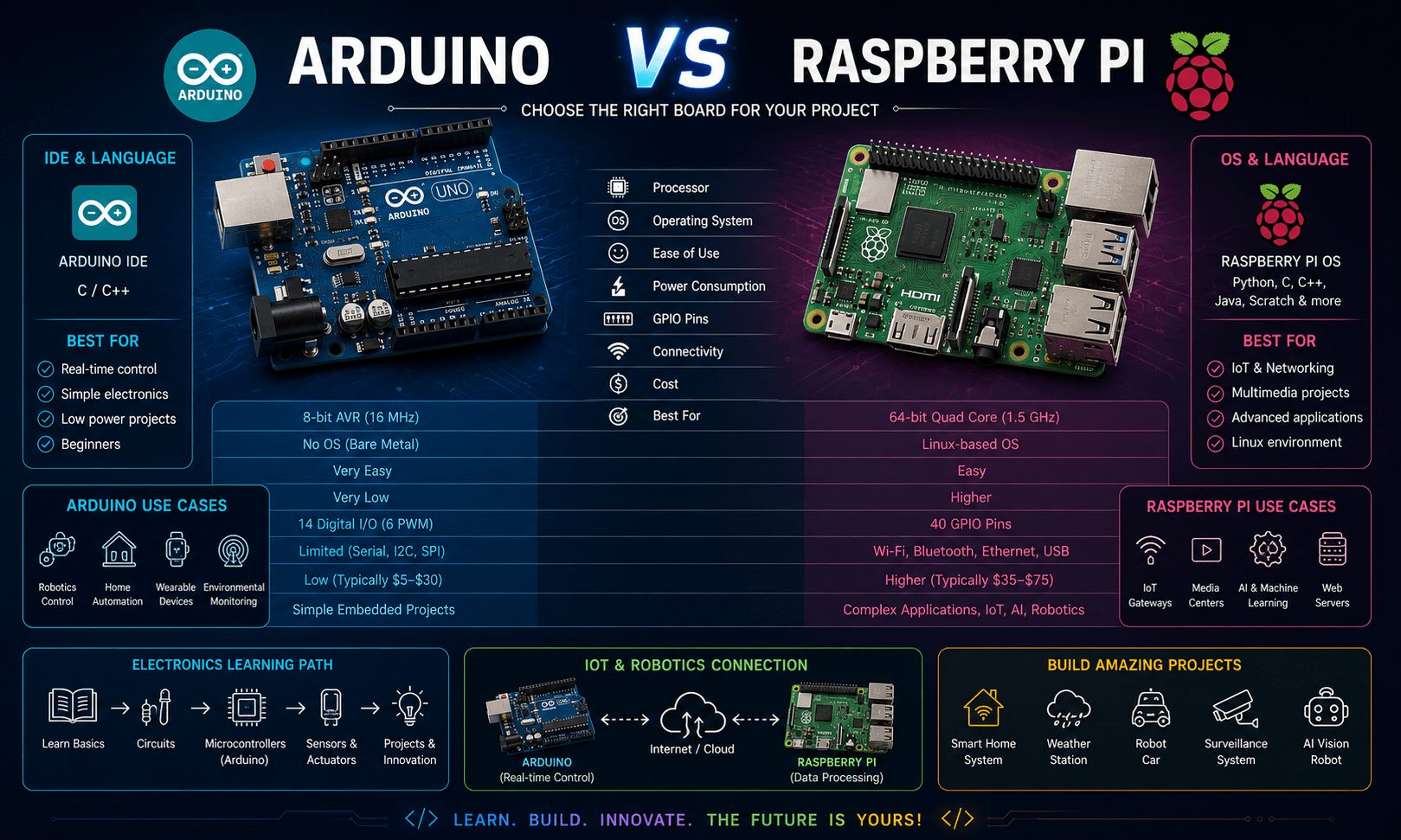
Recommended parameters:
| Parameter | Arduino | Raspberry Pi |
|---|---|---|
| Main Type | Microcontroller | Single-board computer |
| Operating System | Usually not required | Runs an operating system |
| Main Purpose | Hardware control | Computing and software |
| Programming | C/C++ mainly | Python, C/C++, and others |
| Sensors | Excellent | Supported |
| Motor Control | Excellent | Possible |
| Real-Time Control | Better suited | More complex |
| Processing Power | Lower | Higher |
| Power Consumption | Lower | Higher |
| Battery Projects | Very suitable | Less suitable |
| Cameras | Limited | Excellent |
| AI Projects | Limited | Better suited |
| Web Servers | Limited | Excellent |
| Beginner Electronics | Easier | More complex |
8. Which One Is Easier for Beginners?
This section should explain something important:
Both can be beginner-friendly, but they teach different things.
Arduino is usually easier when learning:
- Basic circuits.
- Digital inputs.
- Analog sensors.
- LEDs.
- Motors.
Raspberry Pi may introduce more concepts at the same time:
- Linux.
- File systems.
- Networking.
- Software installation.
- Python.
- Operating system management.
9. Arduino for Learning Electronics and Hardware
This section should strongly explain why Arduino is an excellent starting point for electronics beginners.
Topics:
- Understanding voltage and signals.
- Digital input/output.
- Analog input.
- Sensors.
- Actuators.
- Motors.
- Relays.
Example projects:
- Temperature monitor.
- Motion detector.
- Automatic light.
- Distance sensor.
- Motor controller.
10. Raspberry Pi for Learning Computers and Software
Explain that Raspberry Pi is closer to a traditional computer.
Topics:
- Linux.
- Python.
- Networking.
- Software applications.
- Web servers.
- Databases.
- Automation.
This is particularly useful for beginners interested more in software and computing than electronics.
11. Arduino vs Raspberry Pi for Programming
Explain the programming difference.
Arduino
Usually teaches:
- Embedded programming.
- C/C++ concepts.
- Variables.
- Functions.
- Hardware control.
Raspberry Pi
Can introduce:
- Python.
- Linux commands.
- JavaScript.
- C/C++.
- Web development.
12. Arduino vs Raspberry Pi for Sensors and Hardware Control
Explain why Arduino is generally easier for direct hardware interaction.
Examples:
- Temperature sensor.
- PIR sensor.
- Ultrasonic sensor.
- LDR.
- Soil moisture sensor.
Outputs:
- LED.
- Relay.
- DC motor.
- Servo motor.
This section is especially important for your electronics-focused audience.
13. Arduino vs Raspberry Pi for Robotics
Divide robotics into two levels.
Beginner Robotics → Arduino
Examples:
- Line-following robot.
- Obstacle avoidance robot.
- Robot car.
- Servo projects.
Advanced Robotics → Raspberry Pi
Examples:
- Computer vision.
- Camera processing.
- AI.
- Object detection.
- Navigation.
Also explain that advanced robots can use both platforms together, with Arduino handling direct hardware control and Raspberry Pi handling higher-level processing.
14. Arduino vs Raspberry Pi for IoT Projects
This should be a major section.
Explain the different roles.
Arduino or similar microcontrollers:
Good for:
- Sensor nodes.
- Reading data.
- Low-power devices.
- Simple automation.
Raspberry Pi:
Good for:
- IoT gateways.
- Dashboards.
- Local servers.
- Databases.
- Data processing.
You can also introduce ESP32 here as the natural next step for beginners interested in wireless IoT.
15. Arduino vs Raspberry Pi for Smart Home Projects
Give practical examples.
Better suited to Arduino:
- Automatic lights.
- Temperature-controlled fans.
- Motion alarms.
- Simple relay automation.
Better suited to Raspberry Pi:
- Smart home dashboards.
- Automation servers.
- Multiple-device management.
- Advanced integrations.
16. Arduino vs Raspberry Pi for Camera and AI Projects
This section is important because beginners often assume Arduino can do everything Raspberry Pi can do.
Explain that Raspberry Pi is generally better suited to:
- Cameras.
- Image processing.
- Computer vision.
- AI models.
Arduino is generally more suitable for:
- Simple sensor processing.
- Hardware control.
- Embedded automation.
17. Power Consumption and Battery Projects
Explain why power consumption matters.
Arduino is generally better suited to:
- Battery-powered sensors.
- Low-power embedded devices.
- Long-running control systems.
Raspberry Pi generally requires more power because it runs a full operating system and has greater processing capability.
18. Cost and Required Components
Beginners should understand the total project cost, not only the board price.
Arduino projects may require:
- Arduino board.
- USB cable.
- Sensors.
- Breadboard.
- Jumper wires.
Raspberry Pi projects may additionally require:
- Power supply.
- Storage.
- Case.
- Display or remote setup.
- Keyboard and mouse in some setups.
19. What Projects Can You Build with Arduino?
Provide a project list.
Examples:
- LED projects.
- Temperature monitor.
- Smart irrigation.
- Robot car.
- Automatic lighting.
- Water level monitor.
- Motion alarm.
- Servo control.
- Relay automation.
20. What Projects Can You Build with Raspberry Pi?
Examples:
- Web server.
- Home server.
- Security camera.
- AI camera.
- Media center.
- Smart home dashboard.
- Network monitor.
- Python automation.
- IoT gateway.
21. Can Arduino and Raspberry Pi Work Together?
This is a very valuable section.
Explain a real-world architecture:
Arduino handles:
- Sensors.
- Motors.
- Relays.
- Timing.
- Real-time control.
Raspberry Pi handles:
- Dashboard.
- Database.
- Internet.
- Camera.
- AI.
- Cloud communication.
Example:
Smart Greenhouse Project
Arduino:
- Reads temperature.
- Reads soil moisture.
- Controls water pumps.
Raspberry Pi:
- Displays data.
- Stores historical information.
- Connects to cloud services.
22. When Should You Choose Arduino?
Create a clear checklist.
Choose Arduino if you want to:
- Learn electronics.
- Control sensors.
- Control motors.
- Build robots.
- Create embedded projects.
- Build battery-powered devices.
- Learn hardware programming.
23. When Should You Choose Raspberry Pi?
Choose Raspberry Pi if you want to:
- Learn Linux.
- Learn Python.
- Build servers.
- Use cameras.
- Work with AI.
- Create dashboards.
- Build software-based projects.
24. Arduino or Raspberry Pi: Which One Should You Learn First?
This should be the main decision section of the article.
Recommended conclusion:
Start with Arduino if:
You are interested in:
- Electronics.
- Robotics.
- Sensors.
- Embedded systems.
- Hardware.
Start with Raspberry Pi if:
You are interested in:
- Linux.
- Programming.
- Servers.
- Cameras.
- AI.
For a complete beginner in electronics, Arduino is usually the clearer starting point, which is also the main recommendation presented in the reference article.
25. A Recommended Learning Path for Beginners
I recommend this learning path:
Step 1: Basic Electronics
Learn:
- Voltage.
- Current.
- Resistance.
- LEDs.
- Buttons.
Step 2: Arduino Basics
Learn:
- Digital pins.
- Analog pins.
- Inputs.
- Outputs.
Step 3: Sensors and Actuators
Learn:
- Temperature sensors.
- PIR sensors.
- Ultrasonic sensors.
- Motors.
- Relays.
Step 4: Arduino Programming
Learn:
- Variables.
- Conditions.
- Loops.
- Functions.
Step 5: Wireless Projects
Move to:
- ESP32.
- Wi-Fi.
- Bluetooth.
- IoT.
Step 6: Raspberry Pi
Learn:
- Linux.
- Python.
- Networking.
- Servers.
Step 7: Combine Both Platforms
Build complete systems using:
- Microcontroller for hardware.
- Raspberry Pi for processing.
26. Common Beginner Mistakes When Choosing a Platform
This section will add significant value to your article.
Common mistakes:
Choosing Raspberry Pi Just Because It Is More Powerful
- More power does not always mean it is the right tool.
Choosing Arduino for a Computer-Level Task
- Arduino is not designed to replace a Linux computer.
Ignoring Project Requirements
- The board should be selected based on the project.
Buying Too Many Components
- Beginners should start with a simple starter kit.
Trying to Learn Everything at Once
- Start with one platform and build practical projects.
27- Frequently Asked Questions
Is Arduino better than Raspberry Pi?
Arduino is better for sensors, motors, real-time hardware control, robotics, automation, and beginner
electronics. Raspberry Pi is better for Linux, Al, camera processing, web servers, dashboards, and
software applications.
Should I learn Arduino or Raspberry Pi first?
If you are new to electronics, start with Arduino first. If you are more interested in Linux, Python, web
servers, cameras, and software projects, start with Raspberry Pi.
Is Raspberry Pi more powerful than Arduino?
Yes. Raspberry Pi is more powerful because it is a single-board computer that can run an operating
system. Arduino is simpler and better for direct hardware control and microcontroller projects.
Can Arduino and Raspberry Pi work together?
Arduino or ESP32 is better for simple IoT sensor nodes and low-power devices. Raspberry Pi is better for
IoT gateways, dashboards, local servers, databases, and advanced processing.
Which is better for IoT, Arduino or Raspberry Pi?
Arduino or ESP32 is better for simple IoT sensor nodes and low-power devices. Raspberry Pi is better for
IoT gateways, dashboards, local servers, databases, and advanced processing.
Which is better for robotics, Arduino or Raspberry Pi?
Arduino is better for beginner robotics, motor control, sensors, and simple autonomous robots.
Raspberry Pi is better for advanced robotics that need cameras, Al, computer vision, mapping, and high-
level processing.
Does Arduino use Python?
Arduino mainly uses C/C++ through the Arduino IDE. Python can be used from a computer to
communicate with Arduino, but classic Arduino boards do not normally run Python directly.
Does Raspberry Pi use Python?
Yes. Raspberry Pi commonly uses Python, especially for automation, GPIO control, Al projects, camera
projects, web apps, and beginner programming. It can also use many other languages.
Which one is cheaper, Arduino or Raspberry Pi?
Arduino boards are usually cheaper for simple electronics projects. Raspberry Pi can cost more because
you may also need a power supply, SD card, case, keyboard, mouse, monitor, or camera accessories.
What should I learn after Arduino?
After Arduino, you can learn ESP32, IoT development, embedded C/C++, STM32, PCB design, Raspberry
Pi, Linux, robotics, and Python automation.
28- Conclusion
The conclusion should clearly state:
Then summarize:
- Arduino → Hardware control and embedded systems.
- Raspberry Pi → Computing and software applications.
- Arduino first → Best path for most electronics beginners.
- Raspberry Pi first → Good choice for software-focused beginners.
- Both together → Powerful solution for advanced projects.
Arduino أم Raspberry Pi؟ من أين تبدأ؟
قائمة المحتويات
- المقدمة.
- Arduino أم Raspberry Pi: الإجابة السريعة.
- ما هو Arduino؟
- ما هو Raspberry Pi؟
- Arduino مقابل Raspberry Pi: ما الفرق الأساسي بينهما؟
- المتحكم الدقيق مقابل الحاسوب أحادي اللوحة.
- جدول مقارنة Arduino وRaspberry Pi.
- أيهما أسهل للمبتدئين؟
- Arduino لتعلم الإلكترونيات.
- Raspberry Pi لتعلم البرمجة والحوسبة.
- Arduino مقابل Raspberry Pi في البرمجة.
- Arduino مقابل Raspberry Pi للتحكم في الحساسات والمكونات.
- Arduino مقابل Raspberry Pi في الروبوتات.
- Arduino مقابل Raspberry Pi في مشاريع إنترنت الأشياء.
- Arduino مقابل Raspberry Pi في مشاريع المنزل الذكي.
- Arduino مقابل Raspberry Pi لمشاريع الكاميرات والذكاء الاصطناعي.
- استهلاك الطاقة والمشاريع التي تعمل بالبطاريات.
- التكلفة والمكونات المطلوبة.
- ما المشاريع التي يمكنك تنفيذها باستخدام Arduino؟
- ما المشاريع التي يمكنك تنفيذها باستخدام Raspberry Pi؟
- هل يمكن لـ Arduino وRaspberry Pi العمل معًا؟
- متى تختار Arduino؟
- متى تختار Raspberry Pi؟
- Arduino أم Raspberry Pi: أيهما يجب أن تتعلم أولًا؟
- مسار تعلم مقترح للمبتدئين.
- أخطاء شائعة يرتكبها المبتدئون عند اختيار المنصة.
- الأسئلة الشائعة.
- الخلاصة.
مدة القراءة: حوالي 20 دقيقة.
1. المقدمة
يُعد Arduino وRaspberry Pi من أشهر المنصات المستخدمة في التعلم والمشاريع التقنية، لكن كل واحدة منهما صُممت لأغراض مختلفة. يعتمد Arduino على المتحكمات الدقيقة، ولذلك يناسب مشاريع الإلكترونيات البسيطة والتحكم في الحساسات والمحركات والمكونات الإلكترونية، كما يتميز بانخفاض استهلاك الطاقة وسهولة البدء. أما Raspberry Pi فهو حاسوب صغير متكامل يمكنه تشغيل نظام تشغيل يعتمد على Linux، ويُستخدم في البرمجة والخوادم والكاميرات والوسائط ومشاريع إنترنت الأشياء المتقدمة. لذلك فإن اختيار المنصة المناسبة يعتمد بشكل أساسي على نوع المشاريع التي ترغب في تنفيذها وما تريد تعلمه.
2. Arduino أم Raspberry Pi: الإجابة السريعة
الاختيار يعتمد على الهدف الذي تريد الوصول إليه.
- اختر Arduino إذا كنت ترغب في تعلم الإلكترونيات والحساسات والمصابيح والمحركات والمرحلات والأنظمة المضمنة.
- اختر Raspberry Pi إذا كنت مهتمًا بـ Linux وPython والشبكات والكاميرات والخوادم والمشاريع البرمجية.
بشكل مبسط، يساعدك Arduino على فهم كيفية التحكم في الأجهزة الإلكترونية، بينما يمنحك Raspberry Pi بيئة أقرب إلى الحاسوب التقليدي لتعلم البرمجة والحوسبة وتشغيل التطبيقات.
3. ما هو Arduino؟
Arduino منصة تعتمد على المتحكمات الدقيقة ومصممة للتفاعل المباشر مع الأجهزة الإلكترونية.
- يعمل Arduino باستخدام متحكم دقيق.
- يتعامل مباشرة مع المداخل والمخارج الإلكترونية.
- ينفذ برنامجًا مخصصًا للتحكم في المشروع.
- لا يحتاج عادةً إلى نظام تشغيل كامل.
- يمكنه قراءة الإشارات والتحكم في الأجهزة المختلفة.
أمثلة على المكونات التي يمكن استخدامها مع Arduino
- مصابيح LED.
- الأزرار والمفاتيح.
- الحساسات.
- محركات التيار المستمر.
- محركات السيرفو.
- المرحلات Relay.
- الشاشات.
- وحدات الاتصال اللاسلكي.
4. ما هو Raspberry Pi؟
Raspberry Pi هو حاسوب صغير أحادي اللوحة قادر على تشغيل نظام تشغيل وتطبيقات متعددة.
- يُعد Raspberry Pi حاسوبًا أحادي اللوحة.
- يمكنه تشغيل نظام Linux.
- يوفر قدرة معالجة أعلى من معظم لوحات Arduino التقليدية.
- يمكنه تشغيل أكثر من برنامج وتطبيق.
- يدعم الشبكات والأجهزة الطرفية المختلفة.
أمثلة على الأجهزة التي يمكن استخدامها مع Raspberry Pi
- لوحة المفاتيح.
- الفأرة.
- الشاشة.
- الكاميرا.
- Wi-Fi.
- Ethernet.
5. Arduino مقابل Raspberry Pi: ما الفرق الأساسي بينهما؟
الفرق الرئيسي هو أن كل منصة صُممت لنوع مختلف من المهام والمشاريع.
Arduino
- التحكم المباشر في الأجهزة الإلكترونية.
- الأنظمة المضمنة.
- المهام التي تحتاج إلى استجابة مباشرة.
- قراءة الحساسات.
- التحكم في المحركات.
Raspberry Pi
- الحوسبة وتشغيل التطبيقات.
- أنظمة التشغيل.
- البرامج والتطبيقات.
- الشبكات والاتصال بالإنترنت.
- معالجة البيانات والمهام المتقدمة.
6. المتحكم الدقيق مقابل الحاسوب أحادي اللوحة
فهم هذا الفرق يساعدك على معرفة سبب اختلاف طريقة عمل Arduino وRaspberry Pi.
المتحكم الدقيق Microcontroller
- ينفذ برنامجًا مخصصًا لمهمة أو مجموعة من المهام.
- يتحكم مباشرة في المكونات الإلكترونية.
- يستهلك طاقة منخفضة نسبيًا.
- مناسب للأنظمة المضمنة.
الحاسوب أحادي اللوحة Single-Board Computer
- يمكنه تشغيل نظام تشغيل كامل.
- يدعم تشغيل عدة تطبيقات.
- يوفر قدرة معالجة أعلى.
- مناسب للتطبيقات البرمجية والحوسبة المتقدمة.
7. جدول مقارنة Arduino وRaspberry Pi
| المعيار | Arduino | Raspberry Pi |
|---|---|---|
| نوع المنصة | متحكم دقيق | حاسوب أحادي اللوحة |
| نظام التشغيل | لا يحتاج إليه عادةً | يشغل نظام تشغيل |
| الهدف الرئيسي | التحكم في الأجهزة | الحوسبة والتطبيقات |
| البرمجة | C/C++ بشكل أساسي | Python وC/C++ وغيرها |
| الحساسات | ممتاز | مدعوم |
| التحكم في المحركات | ممتاز | ممكن |
| التحكم المباشر | مناسب جدًا | أكثر تعقيدًا |
| قدرة المعالجة | أقل | أعلى |
| استهلاك الطاقة | أقل | أعلى |
| مشاريع البطاريات | مناسب جدًا | أقل ملاءمة |
| الكاميرات | محدود | ممتاز |
| مشاريع الذكاء الاصطناعي | محدودة | أكثر ملاءمة |
| خوادم الويب | محدودة | ممتاز |
| تعلم الإلكترونيات للمبتدئين | أسهل | أكثر تعقيدًا |
8. أيهما أسهل للمبتدئين؟
كلتا المنصتين مناسبتان للتعلم، لكن كل واحدة منهما تقدم تجربة مختلفة.
يكون Arduino أسهل عادةً عند تعلم:
- أساسيات الدوائر الإلكترونية.
- المداخل والمخارج الرقمية.
- الحساسات.
- مصابيح LED.
- المحركات.
بينما يقدم Raspberry Pi مفاهيم إضافية مثل:
- نظام Linux.
- إدارة الملفات.
- الشبكات.
- تثبيت البرامج.
- Python.
- إدارة نظام التشغيل.
9. Arduino لتعلم الإلكترونيات
يُعد Arduino نقطة بداية ممتازة لفهم الإلكترونيات من خلال التجارب والمشاريع العملية.
- فهم الجهد والإشارات الكهربائية.
- المداخل والمخارج الرقمية.
- المداخل التناظرية.
- استخدام الحساسات.
- التحكم في المشغلات.
- التحكم في المحركات.
- استخدام المرحلات.
أمثلة على مشاريع Arduino
- مراقبة درجة الحرارة.
- كاشف الحركة.
- نظام إضاءة تلقائي.
- قياس المسافة.
- التحكم في المحركات.
10. Raspberry Pi لتعلم البرمجة والحوسبة
يوفر Raspberry Pi بيئة تعليمية قريبة من الحاسوب التقليدي لتعلم البرمجة والأنظمة.
- نظام Linux.
- لغة Python.
- الشبكات.
- تطوير التطبيقات.
- خوادم الويب.
- قواعد البيانات.
- الأتمتة.
11. Arduino مقابل Raspberry Pi في البرمجة
برمجة Arduino
- برمجة الأنظمة المضمنة.
- مفاهيم C/C++.
- المتغيرات.
- الدوال.
- التحكم المباشر في الأجهزة.
برمجة Raspberry Pi
- Python.
- أوامر Linux.
- JavaScript.
- C/C++.
- تطوير تطبيقات الويب.
أفضل منصة للبرمجة تعتمد على نوع المشاريع التي ترغب في تطويرها.
12. Arduino مقابل Raspberry Pi للتحكم في الحساسات والمكونات
يوفر Arduino طريقة مباشرة وبسيطة للتعامل مع الحساسات والمكونات الإلكترونية.
أمثلة على الحساسات:
- حساس درجة الحرارة.
- حساس PIR للحركة.
- حساس الموجات فوق الصوتية.
- حساس الضوء LDR.
- حساس رطوبة التربة.
أمثلة على المخرجات:
- مصباح LED.
- Relay.
- محرك DC.
- محرك Servo.
13. Arduino مقابل Raspberry Pi في الروبوتات
روبوتات المبتدئين باستخدام Arduino
- روبوت تتبع الخط.
- روبوت تجنب العوائق.
- السيارات الروبوتية.
- مشاريع محركات Servo.
الروبوتات المتقدمة باستخدام Raspberry Pi
- الرؤية الحاسوبية.
- معالجة الكاميرات.
- الذكاء الاصطناعي.
- اكتشاف الأجسام.
- الملاحة.
يمكن في المشاريع الروبوتية المتقدمة استخدام المنصتين معًا، حيث يتولى Arduino التحكم المباشر في الحساسات والمحركات، بينما يتولى Raspberry Pi معالجة البيانات والكاميرات والمهام الأكثر تعقيدًا.
14. Arduino مقابل Raspberry Pi في مشاريع إنترنت الأشياء
Arduino والمتحكمات المشابهة
- عُقد الحساسات.
- قراءة البيانات.
- الأجهزة منخفضة الطاقة.
- أنظمة الأتمتة البسيطة.
Raspberry Pi في مشاريع IoT
- بوابات إنترنت الأشياء.
- لوحات عرض البيانات.
- الخوادم المحلية.
- قواعد البيانات.
- معالجة البيانات.
يمكن أيضًا الانتقال إلى ESP32 كخطوة مناسبة بعد Arduino للمشاريع التي تحتاج إلى Wi-Fi أو Bluetooth والاتصال اللاسلكي.
15. Arduino مقابل Raspberry Pi في مشاريع المنزل الذكي
مشاريع مناسبة لـ Arduino
- الإضاءة التلقائية.
- التحكم في المراوح حسب الحرارة.
- أنظمة إنذار الحركة.
- التحكم البسيط في المرحلات.
مشاريع مناسبة لـ Raspberry Pi
- لوحات التحكم المنزلية.
- خوادم الأتمتة.
- إدارة عدة أجهزة.
- الربط بين الأنظمة والخدمات المختلفة.
16. Arduino مقابل Raspberry Pi لمشاريع الكاميرات والذكاء الاصطناعي
يُعد Raspberry Pi أكثر ملاءمة للمشاريع التي تحتاج إلى معالجة صور وبيانات معقدة.
Raspberry Pi مناسب بشكل أكبر لـ:
- الكاميرات.
- معالجة الصور.
- الرؤية الحاسوبية.
- نماذج الذكاء الاصطناعي.
بينما يناسب Arduino بشكل أكبر:
- معالجة بيانات الحساسات البسيطة.
- التحكم في الأجهزة.
- أنظمة الأتمتة المضمنة.
17. استهلاك الطاقة والمشاريع التي تعمل بالبطاريات
استهلاك الطاقة عامل مهم عند اختيار المنصة، خصوصًا في المشاريع التي تعمل لفترات طويلة.
Arduino مناسب بشكل أكبر لـ:
- الحساسات التي تعمل بالبطاريات.
- الأجهزة منخفضة الطاقة.
- أنظمة التحكم طويلة التشغيل.
يحتاج Raspberry Pi عادةً إلى طاقة أكبر لأنه يشغل نظام تشغيل كامل ويعتمد على قدرة معالجة أعلى، لذلك قد لا يكون الخيار الأفضل لبعض المشاريع الصغيرة التي تعتمد على البطاريات.
18. التكلفة والمكونات المطلوبة
يجب حساب تكلفة المشروع بالكامل، وليس سعر اللوحة فقط.
مشاريع Arduino قد تحتاج إلى
- لوحة Arduino.
- كابل USB.
- حساسات.
- لوحة Breadboard.
- أسلاك توصيل.
مشاريع Raspberry Pi قد تحتاج بالإضافة إلى ذلك
- مزود طاقة مناسب.
- وسيط تخزين.
- صندوق حماية.
- شاشة أو إعداد اتصال عن بعد.
- لوحة مفاتيح وفأرة في بعض الاستخدامات.
19. ما المشاريع التي يمكنك تنفيذها باستخدام Arduino؟
Arduino مناسب لمجموعة واسعة من المشاريع الإلكترونية والتعليمية.
- مشاريع LED.
- مراقبة درجة الحرارة.
- الري الذكي.
- السيارات الروبوتية.
- الإضاءة التلقائية.
- مراقبة مستوى المياه.
- إنذارات الحركة.
- التحكم في محركات Servo.
- أنظمة التحكم باستخدام Relay.
20. ما المشاريع التي يمكنك تنفيذها باستخدام Raspberry Pi؟
Raspberry Pi مناسب للمشاريع التي تجمع بين البرمجة والحوسبة والشبكات.
- خوادم الويب.
- الخوادم المنزلية.
- كاميرات المراقبة.
- كاميرات الذكاء الاصطناعي.
- مراكز الوسائط.
- لوحات تحكم المنزل الذكي.
- مراقبة الشبكات.
- الأتمتة باستخدام Python.
- بوابات إنترنت الأشياء.
21. هل يمكن لـ Arduino وRaspberry Pi العمل معًا؟
نعم، ويمكن أن يؤدي الجمع بينهما إلى إنشاء أنظمة أكثر قوة ومرونة.
يتولى Arduino عادةً
- قراءة الحساسات.
- التحكم في المحركات.
- تشغيل المرحلات.
- إدارة التوقيت.
- التحكم المباشر في الأجهزة.
يتولى Raspberry Pi عادةً
- لوحات عرض البيانات.
- قواعد البيانات.
- الاتصال بالإنترنت.
- الكاميرات.
- الذكاء الاصطناعي.
- الخدمات السحابية.
مثال: مشروع دفيئة ذكية
يمكن لـ Arduino:
- قراءة درجة الحرارة.
- قراءة رطوبة التربة.
- التحكم في مضخات المياه.
ويمكن لـ Raspberry Pi:
- عرض البيانات.
- حفظ السجلات السابقة.
- الاتصال بالخدمات السحابية.
22. متى تختار Arduino؟
اختر Arduino إذا كان هدفك الأساسي هو تعلم الإلكترونيات والتحكم المباشر في الأجهزة.
- تعلم الإلكترونيات.
- استخدام الحساسات.
- التحكم في المحركات.
- بناء الروبوتات.
- تنفيذ الأنظمة المضمنة.
- إنشاء مشاريع تعمل بالبطاريات.
- تعلم برمجة الأجهزة الإلكترونية.
23. متى تختار Raspberry Pi؟
اختر Raspberry Pi إذا كنت مهتمًا بالبرمجة والحوسبة والشبكات والمشاريع المتقدمة.
- تعلم Linux.
- تعلم Python.
- إنشاء الخوادم.
- استخدام الكاميرات.
- مشاريع الذكاء الاصطناعي.
- إنشاء لوحات تحكم.
- تطوير المشاريع البرمجية.
24. Arduino أم Raspberry Pi: أيهما يجب أن تتعلم أولًا؟
أفضل نقطة بداية تعتمد على المجال الذي تريد التركيز عليه.
ابدأ بـ Arduino إذا كنت مهتمًا بـ
- الإلكترونيات.
- الروبوتات.
- الحساسات.
- الأنظمة المضمنة.
- التحكم في الأجهزة.
ابدأ بـ Raspberry Pi إذا كنت مهتمًا بـ
- Linux.
- البرمجة.
- الخوادم.
- الكاميرات.
- الذكاء الاصطناعي.
بالنسبة للمبتدئ الذي يريد دخول عالم الإلكترونيات، يكون Arduino غالبًا نقطة البداية الأسهل والأوضح. أما إذا كان اهتمامك الأساسي بالبرمجة والحوسبة، فقد يكون Raspberry Pi خيارًا مناسبًا للبدء.
25. مسار تعلم مقترح للمبتدئين
الخطوة 1: أساسيات الإلكترونيات
- الجهد الكهربائي.
- التيار الكهربائي.
- المقاومة.
- مصابيح LED.
- الأزرار.
الخطوة 2: أساسيات Arduino
- الأطراف الرقمية.
- الأطراف التناظرية.
- المداخل.
- المخارج.
الخطوة 3: الحساسات والمشغلات
- حساسات الحرارة.
- حساسات PIR.
- حساسات الموجات فوق الصوتية.
- المحركات.
- المرحلات.
الخطوة 4: برمجة Arduino
- المتغيرات.
- الشروط.
- الحلقات التكرارية.
- الدوال.
الخطوة 5: المشاريع اللاسلكية
- ESP32.
- Wi-Fi.
- Bluetooth.
- إنترنت الأشياء.
الخطوة 6: الانتقال إلى Raspberry Pi
- Linux.
- Python.
- الشبكات.
- الخوادم.
الخطوة 7: الجمع بين المنصتين
- استخدام متحكم دقيق للتحكم في الأجهزة.
- استخدام Raspberry Pi لمعالجة البيانات والتطبيقات المتقدمة.
26. أخطاء شائعة يرتكبها المبتدئون عند اختيار المنصة
اختيار Raspberry Pi لمجرد أنه أكثر قوة
- القوة الأعلى لا تعني دائمًا أنه الخيار المناسب للمشروع.
استخدام Arduino لمهام تحتاج إلى حاسوب كامل
- Arduino ليس بديلًا عن حاسوب يعمل بنظام Linux.
تجاهل متطلبات المشروع
- يجب اختيار المنصة بناءً على احتياجات المشروع الفعلية.
شراء عدد كبير من المكونات منذ البداية
- من الأفضل البدء بمجموعة بسيطة ثم التوسع تدريجيًا.
محاولة تعلم كل شيء في وقت واحد
- ابدأ بمنصة واحدة ونفذ مشاريع عملية قبل الانتقال إلى التقنيات الأخرى.
27. الأسئلة الشائعة
هل Arduino أفضل من Raspberry Pi؟
يعتمد ذلك على المشروع. Arduino أفضل للتحكم في الحساسات والمحركات والإلكترونيات والأنظمة المضمنة، بينما Raspberry Pi أكثر ملاءمة لـ Linux والكاميرات والبرمجة والخوادم ومعالجة البيانات.
هل يجب أن أتعلم Arduino أم Raspberry Pi أولًا؟
إذا كنت جديدًا في عالم الإلكترونيات، فمن الأفضل غالبًا البدء بـ Arduino. أما إذا كنت مهتمًا أكثر بـ Linux وPython والخوادم والكاميرات والمشاريع البرمجية، فيمكنك البدء بـ Raspberry Pi.
هل Raspberry Pi أقوى من Arduino؟
نعم، يوفر Raspberry Pi قدرة معالجة أعلى لأنه حاسوب أحادي اللوحة قادر على تشغيل نظام تشغيل كامل. لكن Arduino أبسط وأكثر ملاءمة للتحكم المباشر في الأجهزة والمشاريع الإلكترونية.
هل يمكن لـ Arduino وRaspberry Pi العمل معًا؟
نعم. يمكن استخدام Arduino للتحكم في الحساسات والمحركات والمهام المباشرة، بينما يستخدم Raspberry Pi لمعالجة البيانات وتشغيل التطبيقات والاتصال بالإنترنت والكاميرات.
أيهما أفضل لمشاريع إنترنت الأشياء؟
يمكن استخدام Arduino أو ESP32 في عقد الحساسات والأجهزة منخفضة الطاقة، بينما يناسب Raspberry Pi بوابات إنترنت الأشياء ولوحات التحكم والخوادم المحلية وقواعد البيانات.
أيهما أفضل للروبوتات؟
Arduino مناسب للروبوتات التعليمية والتحكم في المحركات والحساسات، بينما Raspberry Pi يناسب الروبوتات المتقدمة التي تحتاج إلى كاميرات ورؤية حاسوبية وذكاء اصطناعي ومعالجة بيانات أكبر.
هل يستخدم Arduino لغة Python؟
تعتمد لوحات Arduino التقليدية بشكل أساسي على برمجة C/C++ من خلال بيئة Arduino IDE. ويمكن استخدام Python على جهاز خارجي للتواصل مع Arduino، لكن اللوحات التقليدية لا تشغل Python مباشرةً في الظروف المعتادة.
هل يمكن استخدام Python مع Raspberry Pi؟
نعم، تُعد Python من أكثر اللغات استخدامًا مع Raspberry Pi، وتستخدم في الأتمتة والتحكم في GPIO والمشاريع التعليمية والكاميرات وتطبيقات الويب والعديد من المشاريع التقنية الأخرى.
أيهما أقل تكلفة، Arduino أم Raspberry Pi؟
تكون مشاريع Arduino غالبًا أقل تكلفة في التطبيقات الإلكترونية البسيطة. أما Raspberry Pi فقد يحتاج إلى مكونات إضافية مثل مزود الطاقة ووسيط التخزين والصندوق والشاشة أو الملحقات الأخرى.
ماذا يمكنني أن أتعلم بعد Arduino؟
بعد تعلم Arduino يمكنك الانتقال إلى ESP32 ومشاريع إنترنت الأشياء وEmbedded C/C++ وSTM32 وتصميم PCB وRaspberry Pi وLinux والروبوتات وPython.
28. الخلاصة
Arduino وRaspberry Pi ليسا منصتين متطابقتين تتنافسان على المهمة نفسها، بل لكل منهما دور مختلف.
- Arduino: مناسب للتحكم في الأجهزة والأنظمة المضمنة.
- Raspberry Pi: مناسب للحوسبة والبرمجة والتطبيقات المتقدمة.
- Arduino أولًا: خيار ممتاز لمعظم المبتدئين في الإلكترونيات.
- Raspberry Pi أولًا: مناسب لمن يركز على البرمجة والحوسبة.
- استخدامهما معًا: يمكن أن يوفر نظامًا قويًا للمشاريع المتقدمة.
في النهاية، لا يعتمد الاختيار على أي منصة هي الأقوى، بل على نوع المشروع الذي تريد تنفيذه والمهارات التي ترغب في تعلمها. إذا كنت تريد البدء بفهم الإلكترونيات والتحكم في المكونات، فإن Arduino يمثل بداية ممتازة. أما إذا كنت ترغب في تعلم Linux والبرمجة والشبكات والتطبيقات المتقدمة، فإن Raspberry Pi سيكون خيارًا مناسبًا.



Leave a comment
You must be logged in to post a comment.