


Makers Electronics sells Arduino boards, Arduino-compatible boards, shields and accessories in Alexandria, with delivery across Egypt. All prices are in EGP, and the live price and stock are on each product page. Product titles say when a board is an original Arduino or an Arduino-compatible board.
Arduino boards available now



Shields and accessories in stock


More: browse all Arduino boards, Arduino shields and Arduino accessories.
Which Arduino board should you choose?
| Board | Microcontroller | Pins | USB | Good for |
|---|---|---|---|---|
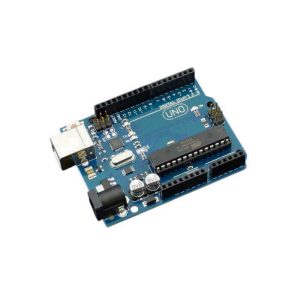
| Arduino Uno R3 | ATmega328P, 16 MHz, 5 V, 32 KB flash | 14 digital (6 PWM), 6 analog | USB-B | Learning, most tutorials and the widest choice of shields |
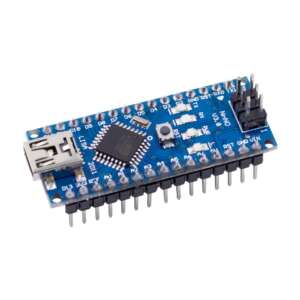
| Arduino Nano | ATmega328 family, 16 MHz, 5 V (some boards use the ATmega168 with 16 KB flash) | 14 digital (6 PWM), 8 analog | Mini USB, Micro USB or Type-C | Small projects that plug into a breadboard |
| Arduino Mega 2560 | ATmega2560, 16 MHz, 5 V, 256 KB flash | 54 digital (15 PWM), 16 analog, 4 serial ports | USB-B | Projects with many sensors, motors and displays |
| Arduino Pro Micro | ATmega32U4, 16 MHz (5 V version), 32 KB flash | Compact board with 12 digital and 4 analog pins | Native USB (Micro USB or Type-C) | USB keyboards, mice and game controllers (HID) |
| Arduino Pro Mini | ATmega328P, 16 MHz (5 V version) | Tiny board, no USB port | Needs a USB-to-serial adapter | Permanent, space-limited projects |
| Arduino UNO R4 Minima | Renesas RA4M1 (Arm Cortex-M4, 48 MHz), 256 KB flash, 32 KB SRAM, 5 V | Same layout as the Uno R3 | USB-C | An Uno-shaped board with a faster 32-bit chip |
Quick rules
- First board? Start with an Uno: nearly every tutorial and shield is written for it.
- Short of space? Use a Nano or a Pro Mini. Need many pins? Use a Mega 2560.
- Want your project to act as a USB keyboard or mouse? Use the Pro Micro (ATmega32U4).
- Need Wi-Fi or Bluetooth? These Arduino boards do not have it built in: look at our ESP32 boards, or add a wireless module.
- Most Arduino boards here run at 5 V. Do not connect a 3.3 V-only sensor or module directly to a 5 V pin: use a level shifter or a 3.3 V board.
- Do not power motors or relays from the board’s 5 V pin: use a separate supply and a driver or motor shield.
- Boards with a CH340 USB chip need the CH340 driver on some computers. If your board is not detected, install it.
Guides
- Arduino or Raspberry Pi? Where to start
- Arduino wireless communication
- Arduino: motor connections, control and programming
- I2C vs SPI vs UART: choosing the right communication protocol
Looking for a single-board computer instead? See Raspberry Pi in Egypt.
Frequently asked questions
Do you deliver Arduino boards across Egypt?
Yes. Orders to Alexandria placed before 2:00 PM are usually delivered the same day, and orders to other governorates are usually delivered the next day. These are typical times, not a guarantee. Shipping cost depends on the governorate and is shown at checkout. See Shipping and Delivery.
Is the board an original Arduino or a compatible board?
Both are sold. The product title and description say when a board is an original Arduino product or a compatible clone, so read them before you order.
Can I return an Arduino board?
Electronic boards and modules cannot be returned or exchanged once opened or used, except for confirmed manufacturing defects. Defects must be reported within 3 days of delivery. Full rules: Refund and Returns Policy.
Do you sell Arduino boards in bulk to schools, universities or companies?
Yes. Contact customer service on +2 0248813824, WhatsApp +20 121 198 1188 or info@makerselectronics.com and you will be connected to the corporate customers team.
Can I visit the store?
Yes: 158 Elhorya St., Elibrahymia, Alexandria, Egypt. Saturday to Thursday 10:00 AM to 8:30 PM, Friday 2:00 PM to 8:00 PM.